AI Resume Review: What It Catches and What It Misses
You paste your resume into a checker, wait ten seconds, and get back a score of 61 out of 100, a red warning about “weak action verbs” and a list of fourteen suggestions. Now what? Fix all fourteen? Ignore the score? Trust it, or assume it is guessing?
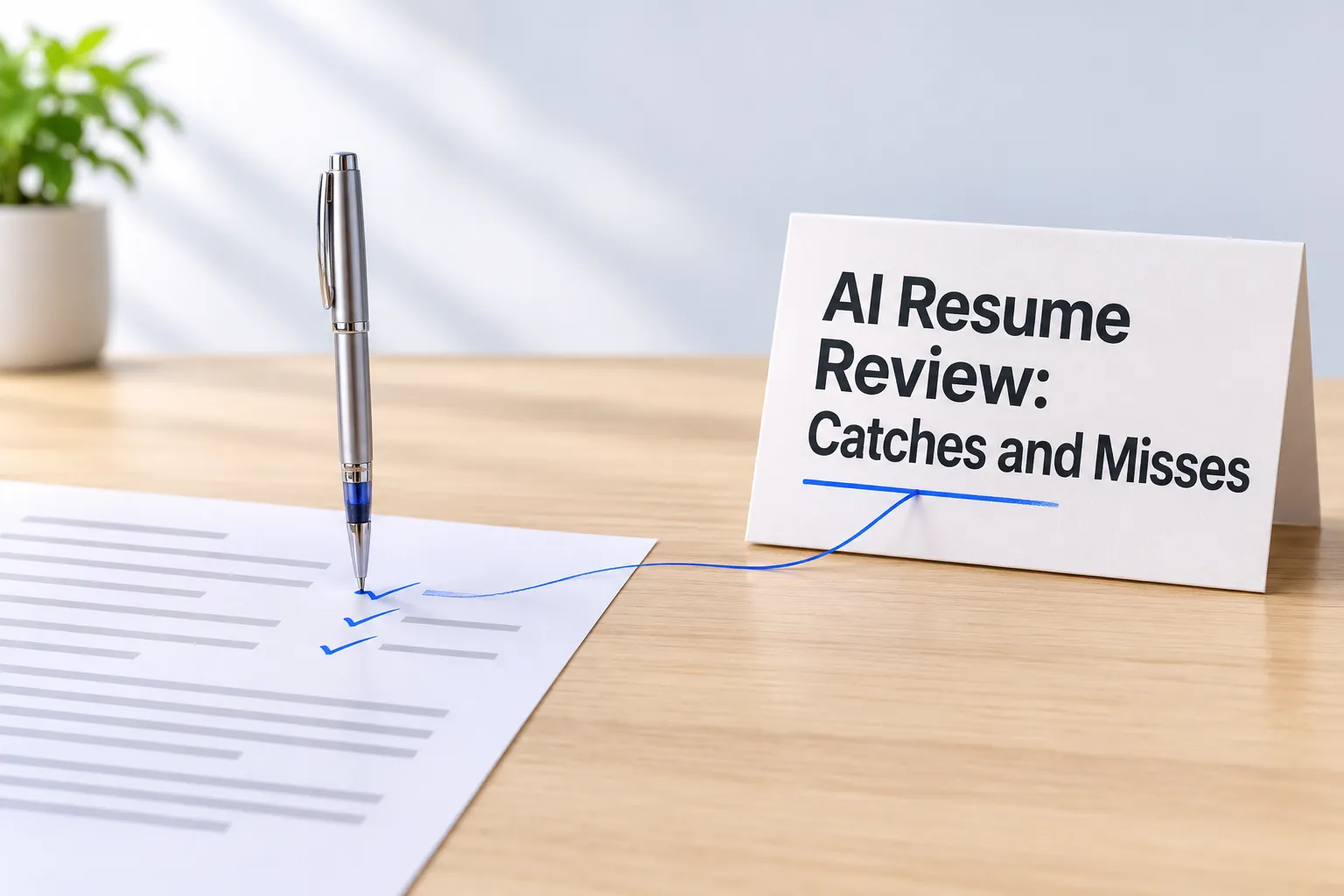
An AI resume review is a fast, structured first read of your resume. It checks how cleanly the file can be parsed, how closely your wording matches a job description, and where your bullets are vague, repetitive or missing a result. It is excellent at mechanical problems and weak at judgement, so treat it as a sharp editor’s first pass, not a verdict on whether you will be hired.
The rest of this article covers what that first pass genuinely catches, what it cannot see, a step-by-step way to run one without being steered into worse writing, and how to keep the file itself intact while you apply the changes.
What an AI Resume Review Actually Does
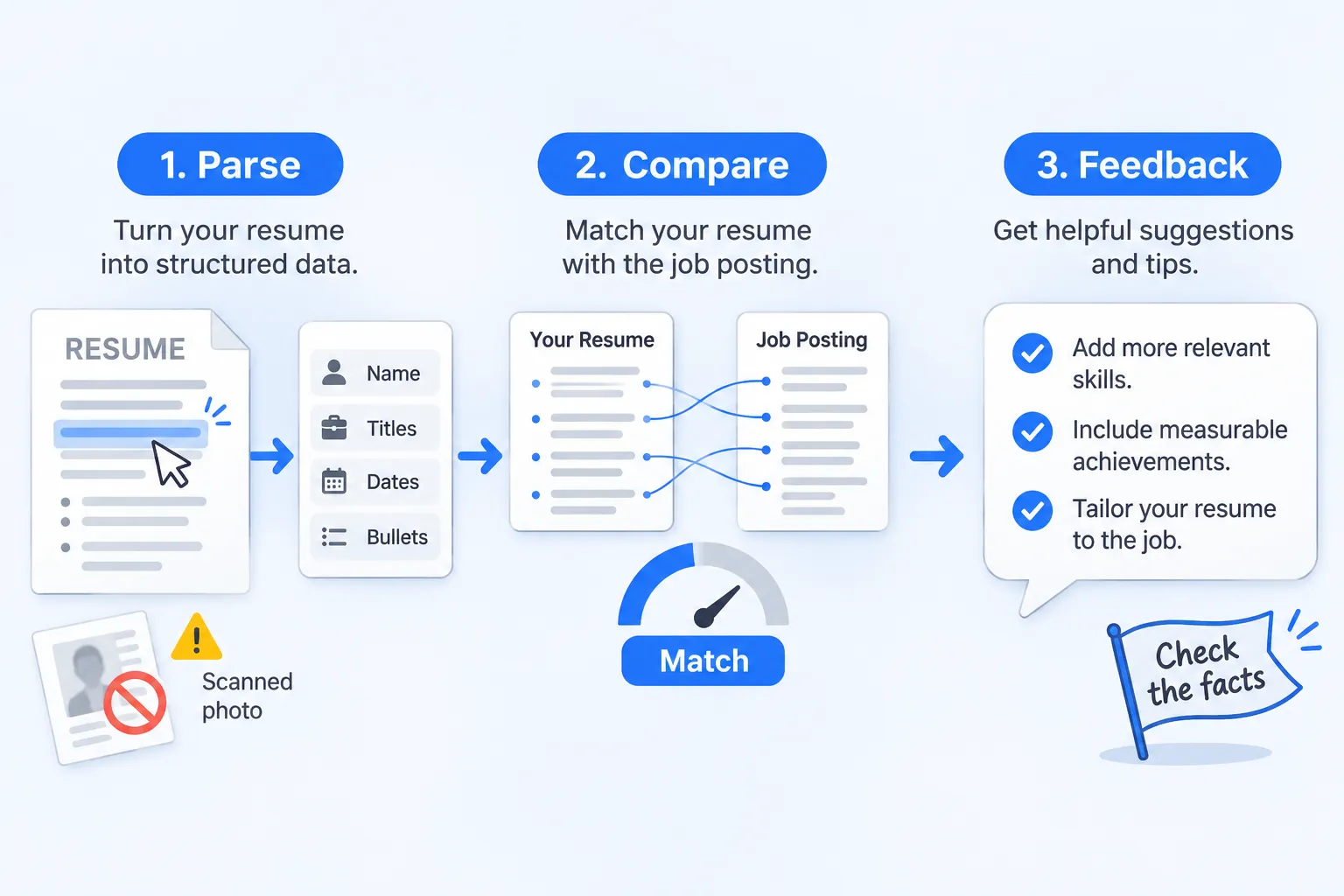
Under the hood, almost every AI resume checker runs the same three stages, whatever the interface looks like.
Stage one is parsing. The tool extracts the text from your file and tries to work out its structure: which block is your name, which lines are job titles, which are dates, which are bullets. If your file is a PDF with a proper text layer, this goes well. If it is a flattened image, a scan or a photo of a printout, there is no text to extract, so the review is built on garbage or on an OCR guess. (That failure has its own explanation in why a scanned PDF is not searchable.)
Stage two is comparison. The tool measures your resume against something: a job description you pasted, a generic model of what a resume in your field looks like, or a set of rules about length, tense and layout. This is where most of the numbers come from, and also where most of the confusion starts, because a score is only as meaningful as the thing it is compared to.
Stage three is feedback generation. A language model reads the parsed text plus the comparison results and writes suggestions in plain English: tighten this bullet, add a metric here, this summary says nothing. The suggestions sound confident because language models write confidently. They are not always correct, and they cannot know facts about your career that are not on the page.
Knowing the three stages tells you where a review can go wrong. A bad parse poisons everything after it. A vague or missing job description makes the comparison generic. And the feedback stage will happily produce plausible advice, including advice to claim skills or results you do not have.
What AI Resume Feedback Catches Reliably
Think of the model as a tireless proofreader with a good memory for job-posting language. It is strongest where the problem is visible in the text itself.
| Problem | How reliably it is caught | Why |
|---|---|---|
| Typos, tense and punctuation slips | Very reliable | Pure pattern checking on the text |
| Inconsistent date formats (Mar 2022 vs 03/2022) | Very reliable | Easy to compare across entries |
| Duty-only bullets with no result | Reliable | Phrases like “responsible for” are obvious signals |
| Missing keywords from a pasted job description | Reliable | Direct comparison of two texts |
| Multi-column layouts, text boxes, tables | Depends on the tool | Reading order can scramble during parsing |
| Whether a claim is true or impressive | Not at all | It sees words, not your career |
Duty bullets and missing results
“Responsible for managing the team’s schedule” tells a reader what your job description said, not what you achieved. A review will flag this pattern every time, and it is usually right. The fix is to say what changed because you were there: fewer delays, a faster process, a larger team supported.
Inconsistency a human skims past
A person reading forty resumes in an afternoon does not notice that your bullets end in full stops in one job and not in another. A model notices instantly. These details are tiny, but together they signal care, and they are the cheapest improvements a review offers.
Keyword gaps
If the posting says “stakeholder reporting” three times and your resume says “updates to leadership,” you may be describing the same work in words a recruiter’s search will not match. A comparison pass is genuinely useful here. The rule is to adopt a posting’s wording only where it honestly describes what you did.
Where an AI Resume Checker Goes Wrong
The same tool that catches a missing full stop will also steer you wrong in predictable ways.
It does not know what is true. Ask for stronger bullets and it will often suggest adding a percentage or a dollar figure. If you did not measure one, that number is invented, and you will have to defend it in an interview. A resume that overstates is worse than one that is plain.
It flattens your voice. Run enough resumes through the same model and you get the same verbs: “spearheaded,” “leveraged,” “orchestrated.” Recruiters have read those words ten thousand times, and they stop registering.
It misjudges context. A gap for caregiving, a pivot from teaching to product work, an academic CV that is correctly six pages long: none of these fit a generic model of a good resume, and the tool may penalise exactly the things that are fine.
It cannot see what you left out. Your best project may not be on the page at all. A review improves what is there; it cannot tell you what is missing from your story.
It optimises the score, not the reader. Once a number is on screen, it is tempting to chase it. Real readers do not see your score, and a resume that is perfectly tuned to a checker can read like it was written by one.
Accepting a suggested metric you cannot back up. If a tool proposes “increased efficiency by 35%” and you have no record of any such figure, delete the number and write what you actually know, even if it is smaller or less tidy.
How to Run an AI Resume Review That Helps Instead of Misleads
The difference between a useful review and a confusing one is mostly process. Here is a sequence that works for a one- or two-page resume.
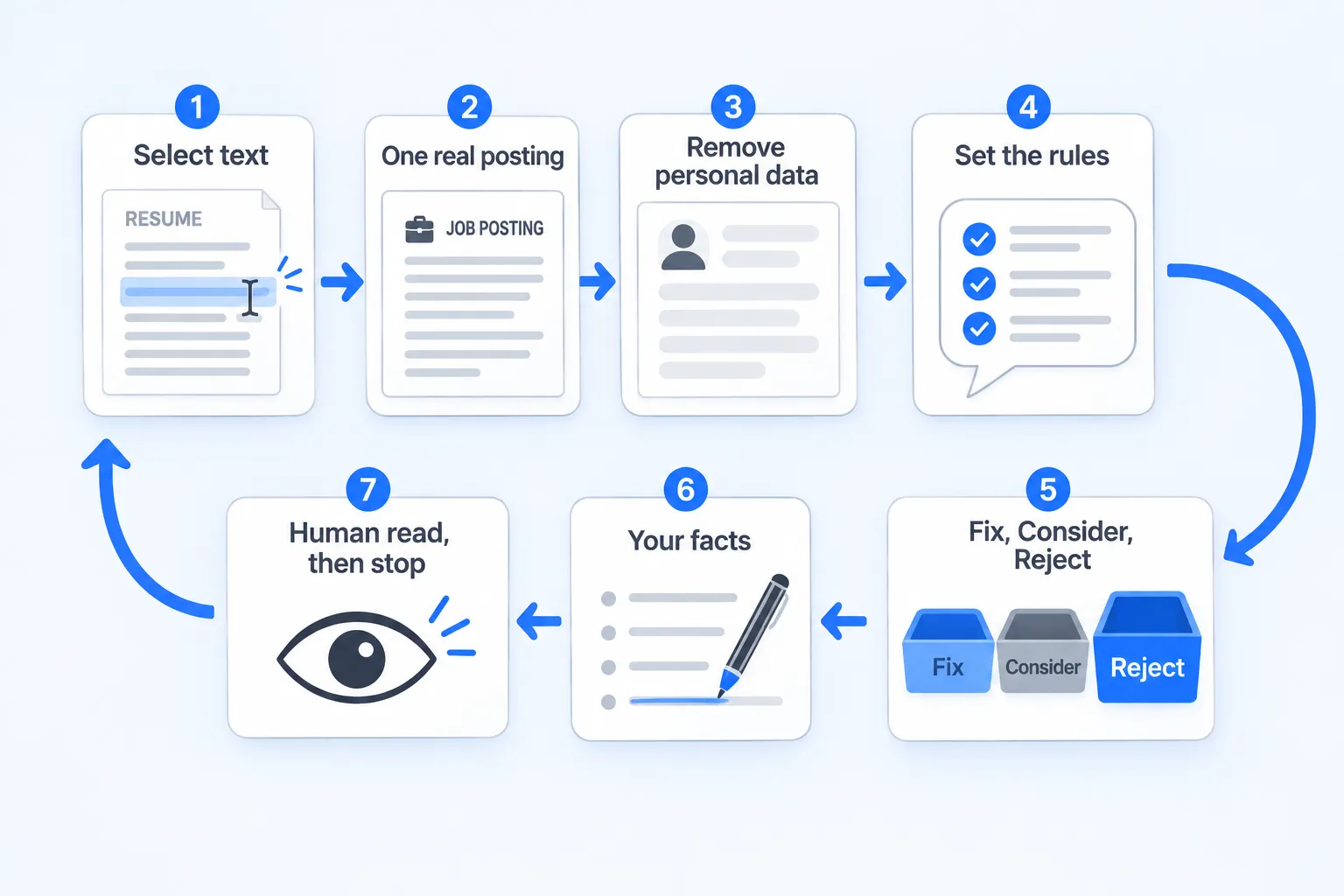
- Check the text layer first. Open your PDF, drag to select a line of text, copy it and paste it into a plain text editor. If nothing copies, or the lines come out in a jumbled order, fix the file before reviewing anything. A tool cannot give sound feedback on text it cannot read.
- Pick one real job posting. Paste the whole thing, not a summary. A review against a specific role is far more useful than a generic one, and a single posting keeps you from trying to please five employers at once.
- Remove what you do not want shared. Home address, personal phone number and anything that works as an identifier can come off for the review and go back on afterwards.
- Give the tool rules. Something like: “List only problems you can quote from my resume. Do not add facts, numbers or skills that are not already there. Mark each suggestion as fix, consider or style.” That one instruction removes most of the invented-claim risk.
- Sort the output into three piles. Fix now (typos, consistency, dates), consider (rewording that might help), reject (anything untrue, off-voice or irrelevant to the role). Expect the reject pile to be larger than you want.
- Rewrite with your own facts. Treat the tool’s wording as a draft. Add numbers only if they come from your records, a performance review, a report or an email you can find.
- Run it once more, then stop. A second pass on the revised version confirms nothing broke. A fifth pass only teaches you to write for the checker. After that, hand it to a person.
Ask the tool to quote the exact line behind every suggestion. If it cannot point to a specific line in your resume, the advice is generic and you can skip it.
A Worked Example: One Bullet, Three Passes
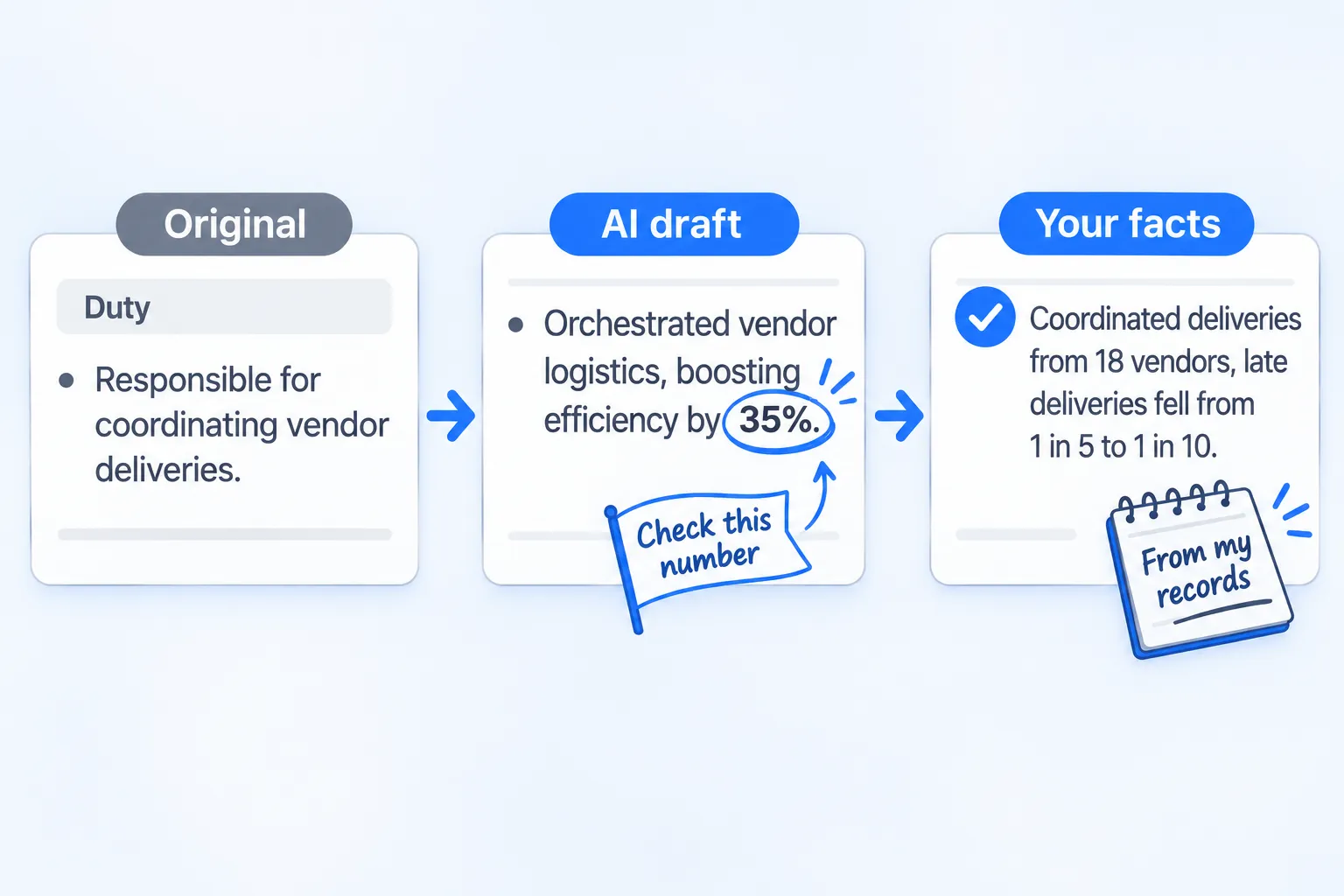
Imagine a project coordinator, call her Priya, applying for an operations coordinator role. This is a hypothetical, but the pattern is the one that shows up again and again. Her original bullet reads: “Responsible for coordinating vendor deliveries and updating the team on schedules.”
Pass one, the tool’s draft. Asked to strengthen the bullet with no rules, the tool returns: “Orchestrated vendor logistics, boosting operational efficiency by 35%.” It reads well. It is also wrong in two ways: “orchestrated” is a filler verb, and the 35% came from nowhere.
Pass two, Priya’s facts. She checks her records. She coordinated deliveries from 18 vendors, sent a schedule update every week to a team of nine, and by her own tracking sheet, late deliveries dropped from roughly one in five to one in ten over two quarters.
Pass three, the final bullet. “Coordinated deliveries from 18 vendors and sent weekly schedule updates to a nine-person team; late deliveries fell from roughly one in five to one in ten over two quarters.”
The tool’s real contribution was the diagnosis: the original bullet described a duty and had no result. Priya’s contribution was everything that makes the final line believable. That split is how a good AI resume review should feel: the model points, you supply the truth.
Priya’s late-delivery figure came from a tracking sheet she kept for her own use. The habit that makes resumes stronger is not better prompting, it is keeping a running note of results as they happen. Ten minutes at the end of each quarter beats an hour of reconstructing numbers at application time.
The ATS Score Myth
Most of the anxiety around resumes comes from one idea: that an applicant tracking system gives your resume a score and throws away anything below a threshold. In practice, most major systems organise applications, store the parsed text and let recruiters search and filter. They do not all produce a single universal pass or fail number, and the number a third-party checker shows you is that checker’s own invention.
That does not mean parsing is irrelevant. If the system cannot read your file, the recruiter’s search will not find you, because there is nothing to search. So the part of an ATS worry worth acting on is practical:
- Use a real text layer, not a screenshot or scan of your resume.
- Keep reading order simple: one main column, standard headings like Experience and Education.
- Avoid putting key details in headers, footers, text boxes or images, where parsers often skip them.
- Spell out job titles and tools the way the posting does, once, where it is true.
A score of 61 versus 74 on a checker tells you very little. A clean parse and honest, specific wording tell you a lot.
A **text layer** is the searchable, selectable text stored inside a PDF. A resume with a text layer can be copied, searched and parsed by software. A resume saved from a photo or scanner without OCR has only pixels, so software sees nothing.
Is an AI Resume Review Safe for Your Personal Data?
A resume is a compact identity document. It usually holds your full name, phone number, email, city, employer history and sometimes a photo or date of birth. Pasting it into a random web form is a data-sharing decision, whatever the button says.
Before you upload, ask four questions:
- Is the file stored, and for how long? Look for a plain statement about retention, not a vague promise.
- Is it used to train models? Many services say yes unless you opt out, and some say yes with no opt-out at all.
- Who else can see it? Shared links, public review pages and “community feedback” features can expose a resume.
- Do you need to send everything? For a review, the answer is often no. Remove your street address, personal phone number and any ID numbers, then restore them in the final version.
The NIST AI Risk Management Framework treats data handling as part of the risk of any AI system, and the same logic applies to the tool you pick: know where the data goes before you decide it is worth it.
Keeping the PDF Intact While You Apply the Edits
Here is the step people underestimate. You finish the review, decide on four changes, and then discover that your finished resume is a PDF. Changing a line means exporting to Word, watching the layout shift, fixing it, exporting again, and finding that a bullet now spills onto page two.
That happens because a PDF stores positioned characters, not flowing paragraphs. It was designed to preserve how a page looks rather than to let text reflow (the PDF Association maintains resources on how the format is structured). A single longer sentence can push everything below it out of place if you rebuild the page from scratch.
The practical fix is to edit the PDF itself. An AI PDF editor like MojoPDF can change a line of resume text in place, in the original font where it can be matched, so a four-word edit stays a four-word edit and the rest of the page does not move.
If you do round-trip through Word anyway, check these before you send: page count, bullet alignment, any font substitution, and whether the text layer still copies cleanly. Then run the selection test from step one again.
AI Resume Review vs a Human Reviewer
The two are not competitors. They look for different things, and the best result uses both in order.
| What you need | AI review | Human reviewer |
|---|---|---|
| Typos, consistency, formatting | Excellent, instant | Good, but misses small slips |
| Matching wording to one posting | Good with a pasted description | Good, with industry insight |
| Judging if the story is persuasive | Weak | Strong |
| Knowing what is missing | Very weak | Strong, if they know your field |
| Spotting an exaggerated claim | Weak | Strong |
| Turnaround time | Seconds | Hours to days |
Use the AI pass first, because it clears the mechanical noise and means your human reviewer spends their attention on the story rather than on date formats. Then ask the person one specific question: “What would make you stop reading?” That question yields more than a request for general feedback.
Mistakes That Waste a Good Review
- Running it against nothing. A generic review gives generic advice. Always paste a real job posting.
- Tailoring to five jobs at once. The result is a resume that suits none of them. Make one master version, then adjust a copy per application.
- Applying every suggestion. The tool’s list is a menu, not a to-do list. If it contradicts your own judgement of your work, your judgement wins.
- Skipping the final read. Read the finished resume out loud. Awkward phrasing that no checker flags becomes obvious when you hear it.
- Forgetting the file. A beautifully reviewed resume saved as a flattened image fails at the first parsing step.
The Review Is a Draft, Not a Verdict
An AI resume review is best understood as a very fast second pair of eyes with no stake in your career and no knowledge of your life. It will find the typo, the vague bullet and the keyword you never used. It will not find the project you forgot to mention or the number you should not have claimed.
Run it once against a real posting, sort the suggestions honestly, rewrite with facts you can defend, and keep the PDF clean when you export. Then let a person read it. That is the version worth sending.
- An AI resume review checks parsing, keyword match and wording, and it is strongest on mechanical problems.
- It cannot verify your claims, so never keep a number you cannot back up.
- Check that your PDF has a real text layer before you review anything.
- A checker’s score is that checker’s own number, not an official ATS verdict.
- Review privacy before uploading, and remove addresses and IDs you do not need to share.
- Run it once or twice, then have a human read the final version.

MojoPDF
Taj
A professional SaaS founder offering great value to it's customers.
Frequently Asked Questions
It is accurate on mechanical issues such as typos, inconsistent dates and vague phrasing, and much less reliable on judgement calls. Treat each suggestion as a proposal, and ask the tool to quote the line it is reacting to so you can verify it.
It depends on the service. Check how long files are kept, whether they are used for model training and whether anyone else can see them. If the policy is unclear, remove your home address, personal phone number and ID details before uploading.
No, but it makes them more useful. The AI clears typos and formatting so a person can spend their time judging your story, your priorities and what is missing from the page.
Language models are not fully deterministic, and many checkers also weigh the job description or settings you changed. A small swing is normal, so focus on the specific suggestions rather than the number.
A PDF with a real text layer is usually the safer choice because it keeps the layout fixed. Send Word only if the employer asks for it, and check that nothing shifted before you submit.
Once to find the problems and once more to confirm your edits worked is plenty. Repeated runs mostly teach you to write for the tool, so move on to a human read after the second pass.
Not from a clean edit, but generic AI phrasing is easy to spot. Words like “spearheaded” and “leveraged” repeated across every bullet can make a resume sound templated, so rewrite in your own voice with your own details.
It can catch typos and consistency issues, but it often misjudges conventions such as long publication lists or regional formats. Tell the tool what kind of document it is, and be cautious about advice to shorten something that is meant to be long.
The most common cause is a file with no text layer, such as a scan, a photo or a PDF made from an image. Heavy use of text boxes, tables or multi-column layouts can also scramble the reading order.
Yes, lightly. Keep one strong master version and adjust a copy for each posting, matching wording only where it honestly describes your work. Rewriting everything for every application is rarely worth the time.
It can help you translate your experience into the target field’s vocabulary, which is useful. It will not understand why your background is relevant, so write that connection yourself in your summary and top bullets.
Take out your street address, personal phone number, date of birth and any ID or government numbers, which a review does not need. Keep your name and job history so the feedback stays specific, and restore your contact details in the final version.