How to Sign Electronically in PDF: What Counts as Legal
When the US Congress passed the ESIGN Act in 2000, it settled a question that still trips people up every week: a signature can’t be denied legal effect solely because it’s electronic. That is the core of how to sign electronically in PDF and have it count. Choose a method that shows you meant to sign, attach it to the right version of the document, and keep proof of what was signed and when. A drawn squiggle on a contract page is valid for most everyday agreements. What gets challenged later is rarely the squiggle. It’s the evidence around it.
That second part is where most guides stop short. They show you where the Sign button lives and leave out the three questions that decide whether the signature survives an argument: which kind of electronic signature you’re really applying, whether this particular document is one the law lets you sign that way, and what you could show if someone claimed they never agreed.
This article covers all three, then the order of operations that keeps a signature solid, and what to do when the PDF refuses to let you sign at all. It’s general information rather than legal advice, so for anything high-value or unusual, ask a lawyer who knows your jurisdiction.
Three Different Things Hide Behind “Electronic Signature”
People use one phrase for three very different objects, and the law treats them differently. Working out which one you’re applying is half the job.
1. A visible mark
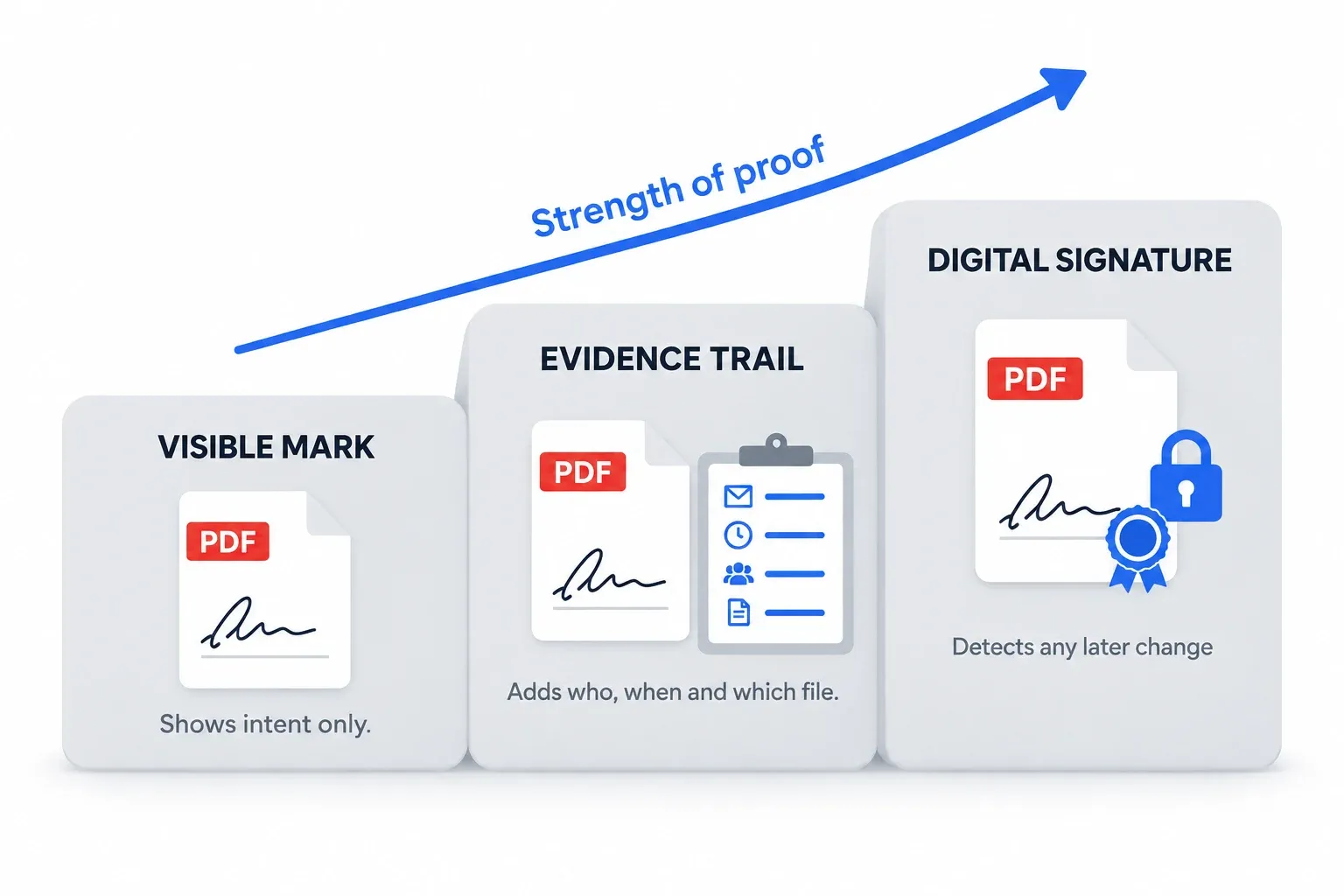
A typed name, a drawn squiggle or a pasted image of your handwriting, placed on the page. Under US law and under the EU’s eIDAS Regulation, this counts as an electronic signature. The PDF itself records nothing about who placed it or when. Its strength comes entirely from what surrounds it: the email it arrived in, your clear intent to sign, and the document’s version.
2. A signature with an evidence trail
Signing platforms wrap that same visible mark in a log: email or phone verification, IP address, timestamps, the order of signers and a fingerprint (hash) of the final document. The PDF you get back usually carries a certificate page summarising it. The log is what turns “someone put a squiggle there” into “this person, reached at this address, opened and signed this exact file at this time.”
3. A cryptographic digital signature
A digital signature is a block of data inside the PDF: a hash of the document’s bytes, signed with the signer’s private key, plus the certificate that identifies them. Change a single character afterwards and the check fails, and viewers show a warning. The PDF format supports this natively (ISO 32000-2), and the PAdES profiles define the stronger variants used in Europe. When the certificate comes from a qualified trust service provider, the EU treats the result as a qualified electronic signature, which carries the same legal effect as a handwritten one in every member state.
Electronic signature: any electronic mark or process that shows intent to sign. Digital signature: a specific cryptographic technique that binds a signer’s identity to the exact bytes of a document and exposes later changes. Every digital signature is an electronic signature, but most electronic signatures are not digital signatures.
Here is how the three compare in practice:
| Visible mark | Evidence trail | Digital signature | |
|---|---|---|---|
| What the PDF proves by itself | Nothing about who or when | Usually a certificate page | Signer identity and that the file is unchanged |
| Detects edits after signing | No | Often, through the final hash | Yes, immediately |
| Typical use | Routine agreements, internal forms | Client contracts, HR paperwork, leases | Regulated, cross-border or high-value documents |
| Cost and effort | Minimal | Platform account | Certificate from a trust provider |
| Biggest weakness | Easy to dispute | Depends on the platform’s records | Setup, and everyone must verify it |
Does an Electronic Signature Hold Up in Court?
For ordinary agreements, yes, in the US, the EU and the UK, though each gets there differently.
In the United States, 15 U.S.C. § 7001, the core of the ESIGN Act, says a signature or contract can’t be denied effect solely because it is in electronic form. State law fills the gaps: nearly every state has adopted the Uniform Electronic Transactions Act, published by the Uniform Law Commission, and New York has its own equivalent statute. Courts then look for four things: that the signer intended to sign, that the parties agreed to do business electronically, that the signature is tied to the record, and that the record is kept in a form that can be reproduced. Consumers get extra protection, since some disclosures require their consent before electronic delivery.
In the EU, the eIDAS Regulation sets three levels: simple, advanced and qualified. A court can’t refuse a simple electronic signature as evidence just because it is electronic, but it will weigh it. An advanced signature must be uniquely linked to the signer and able to reveal later changes. A qualified signature, made with a qualified certificate on a qualified device, is treated as equal to a handwritten signature.
In the UK, the Law Commission of England and Wales concluded in 2019 that an electronic signature is generally valid for executing documents, and that the usual formalities, such as a witness for a deed, still apply.
Notice what these have in common. None of them ranks a drawn squiggle against a typed name. They ask about intent, attribution and integrity: did this person mean to sign, can you show it was them, and is the document still the one they signed? That is why the same visible mark can be perfectly adequate in one dispute and flimsy in another.
Documents That Still Need Ink, a Notary or a Qualified Signature
Not everything can be signed this way, and the exceptions are the part that causes real damage. The ESIGN Act itself carves out several categories, which 15 U.S.C. § 7003 lists. Among them:
- Wills, codicils and testamentary trusts (a few states have their own electronic-will laws).
- Family-law matters such as adoption and divorce.
- Certain notices: cancelling utilities, default, foreclosure or eviction notices for a primary residence, and cancelling health or life insurance.
- Product recall notices and documents that must accompany hazardous materials.
- Parts of the Uniform Commercial Code.
Beyond statutes, three practical limits catch people out:
- Notarisation. Deeds and many powers of attorney need a notary. Remote online notarisation exists in many places but follows its own rules, so a signature you place alone doesn’t replace it.
- The receiving organisation’s rules. Banks, immigration offices, courts and some government agencies state exactly what they accept. A perfectly valid electronic signature still fails if the recipient’s form says wet ink.
- Another country’s law. A document signed in one country and used in another may need a qualified signature or an apostille.
The cheap safeguard is to ask the recipient, in writing, which form of signature they accept before you sign. One sentence in an email saves you from redoing a notarised document.
How to Sign Electronically in PDF, Step by Step Without Weakening It
The order matters more than the tool. Follow these steps in any viewer or editor and the signature stays defensible.
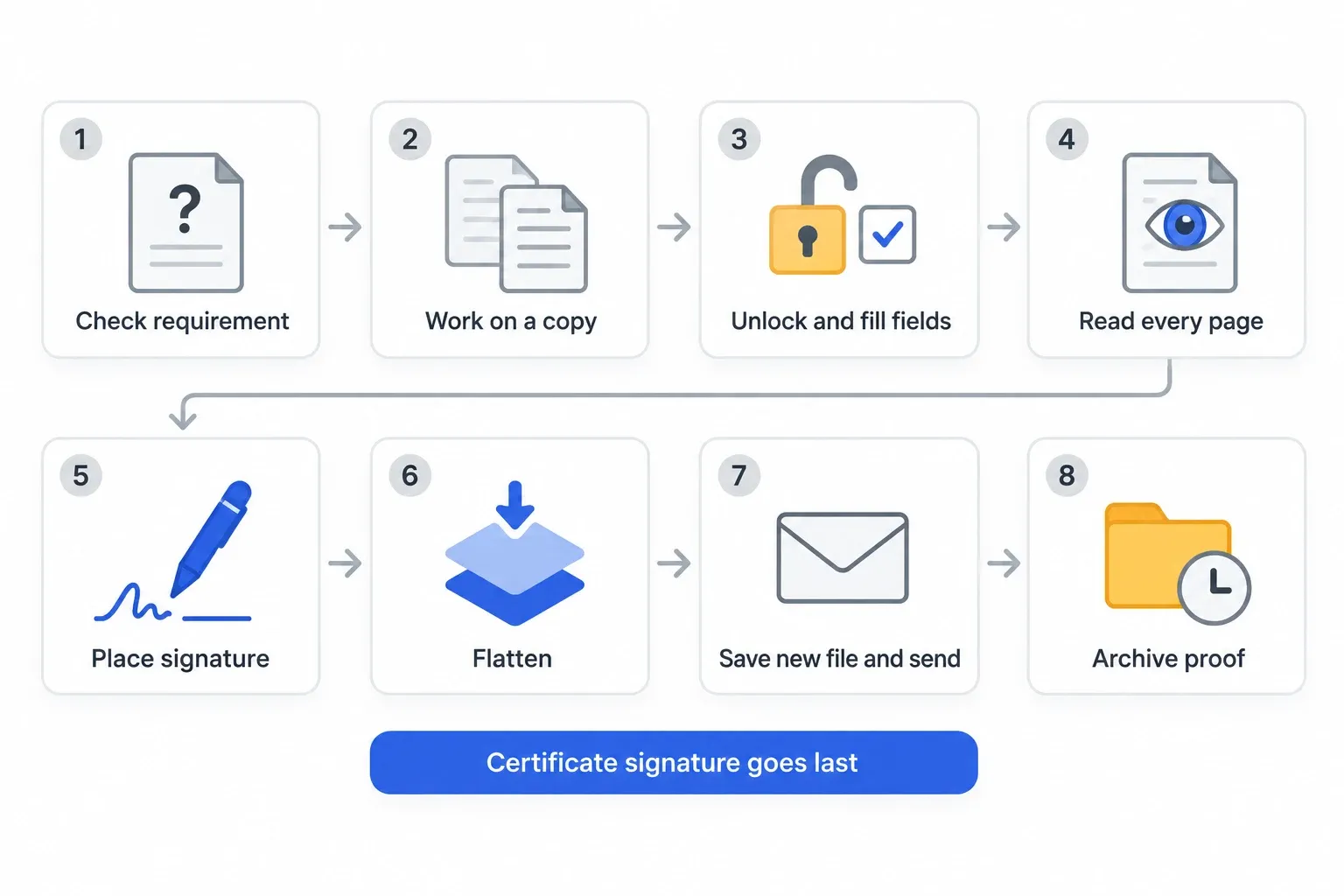
- Confirm what the recipient needs. Check the contract, form or email for the required signature type. If it’s silent, ask. This takes one line and settles the notary-or-not question.
- Work on a copy. Duplicate the file and name it with a version, such as services-agreement-v3-signed.pdf. Keep the unsigned original untouched; you’ll want it later.
- Make sure the file can be signed. Locked files block signing and form filling. If the document opens but the signing tools are greyed out, deal with that first (the next sections cover it).
- Read the final version. Page through every page, including the schedules. You’re signing the whole file, not just the signature line.
- Fill the form fields first. Names, dates, amounts and checkboxes go in before the signature, so nothing needs changing afterwards.
- Place your signature on the line. Type it, draw it or insert an image of it, and add your printed name and the date beside it. Keep it a sensible size and inside the signature box so it doesn’t cover text.
- Flatten if you’re not applying a certificate. Flattening merges the signature and form values into the page so they can’t be dragged or edited casually. If you will apply a certificate-based digital signature, do that last instead, because flattening or editing after it breaks the signature.
- Save as a new file and send it with a trail. Send it by email or through a platform that keeps a log, say plainly in the message what you’re returning, and keep the sent message.
Two points deserve honesty. First, flattening makes a signature harder to tamper with but proves nothing; a flattened signature is just part of the page. Second, if both parties sign, have them sign the same file in turn, or agree in the contract to sign counterparts and keep both. Two people signing slightly different copies is a classic source of later arguments.
The place and flatten steps are also where juggling apps creates risk, because every export and re-upload makes another copy to track. An AI PDF editor like MojoPDF does the placing, flattening and exporting in one workspace, with the processing done in your browser on your own device, so there is one working file instead of three.
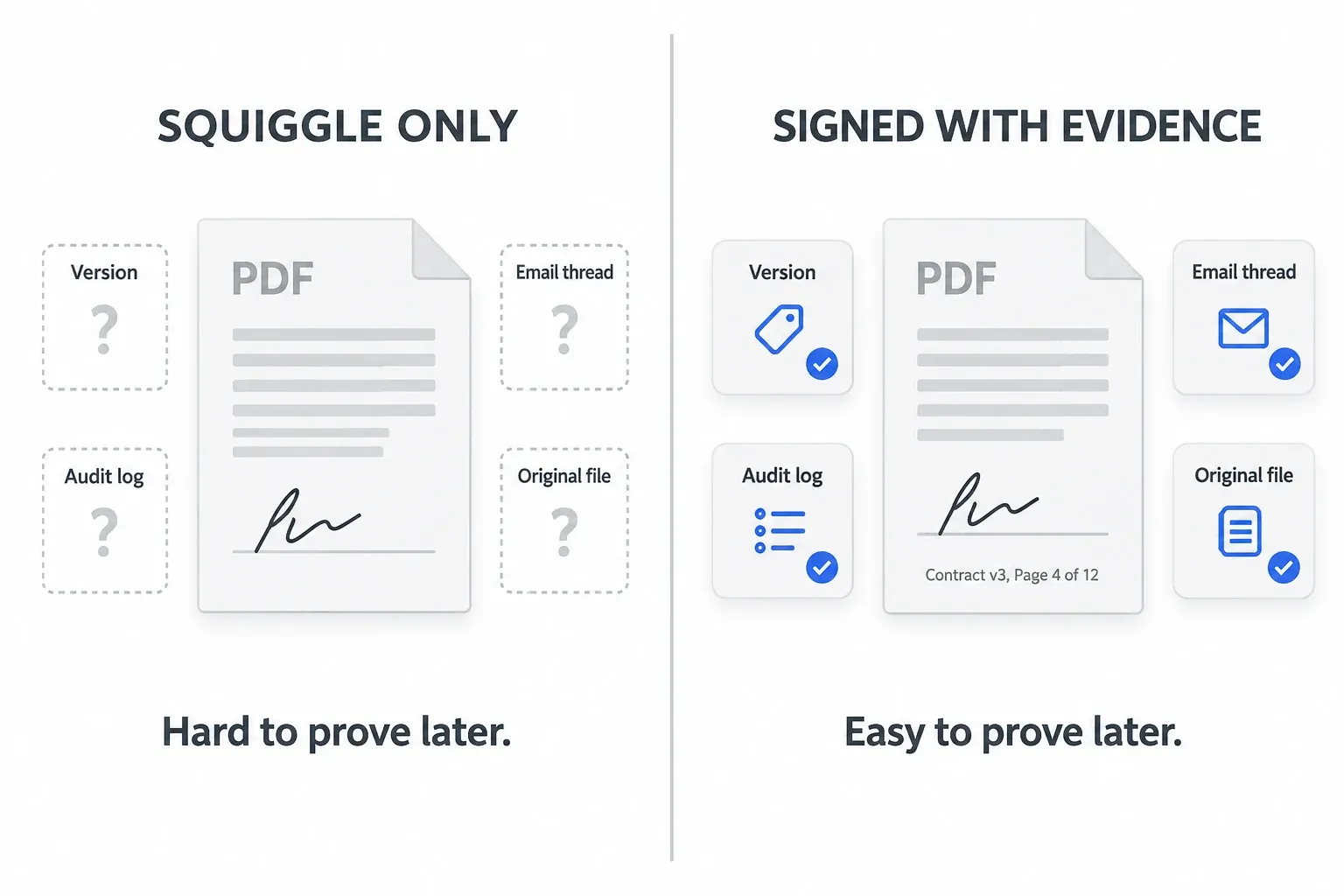
Add the version and page count to the footer before anyone signs, for example “Services Agreement v3 · Page 4 of 12”. If a page is swapped later, the mismatch is visible at a glance.
Typed, Drawn or Uploaded: Does the Look of Your Signature Matter?
Legally, hardly. The question is whether you intended to sign, not whether the squiggle resembles your ink one. Practically, a few things matter more than people expect.
- Consistency. Use the name that appears in the contract, and the same form of it each time, so no one can say the mark isn’t yours.
- Context text. A date and printed name beside the mark connect it to this transaction. A bare image of a signature could have come from anywhere.
- Copyability. A visible signature in a PDF is an image that anyone with the file can extract. For low-trust settings, consider a simplified version of your signature, or add a small line such as “Signed for the Acme services agreement, 12 Nov 2026” beside it, so a copied image looks out of place on another document.
- Resolution. A tiny, blurry image looks careless and can be hard to read when printed. A clean image at modest size is fine.
A typed name in a script font is just as valid as a drawn one in most places. If the other party’s system or a regulator expects something that looks like handwriting, draw it or upload it.
Why Is the Sign Option Greyed Out or Missing?
When you try to sign electronically in a PDF and the tools won’t respond, the cause is usually one of five things.
The file has a permissions lock
A permissions password can block signing, form filling and commenting while still letting the file open. The fix is to save an unprotected copy, if you have the right to do so. The post on removing a password from a PDF explains how to tell which lock you’re facing.
An earlier signature certified the document
A certifying signature can state that no further changes are allowed, or that only form filling and signing are. If the certifier allowed nothing more, you can’t add yours to that file. Ask them to reissue it with signatures permitted.
The form fields were flattened
If someone flattened the form before sending it, the fields are now plain pictures of boxes. You can still place a signature on the page, but you’ll have to add the other entries as text. If you need the original fields back, see how to make a PDF editable.
The file is a scan
A scanned contract is a picture of a page, but you can still place a signature image on it. Check that your signature lands inside the box and the scan is straight, because a skewed page makes the mark look misaligned.
The viewer is in a restricted mode
Browser previews and protected-view modes often disable signing. Open the file in a full viewer or editor, or download it first.
A Worked Example: Three Versions, Two Countries, One Contract
Imagine a freelance designer in Lisbon agreeing a €14,000 branding project with a client in Ohio. The contract goes through three drafts before both sides are happy.
Here is what a defensible signing looks like. The designer exports the final draft as branding-agreement-v3.pdf and adds a footer reading “Branding Agreement v3 · Page 1 of 9” (and so on) to every page. She emails it to the client with a line saying that v3 replaces the earlier drafts and that returning the signed file means agreement to its terms. The client opens v3, fills in his company name and billing address, and places a drawn signature with printed name and date on the signature line. He flattens it, saves it as branding-agreement-v3-signed-client.pdf, and replies on the same thread. The designer countersigns that same file, saves it as branding-agreement-v3-fully-signed.pdf, and replies with it again.
Six months later the client claims the scope was meant to include packaging design. The designer produces the fully signed file, the email thread with timestamps showing v3 replaced the earlier drafts, and the unsigned v3 she kept. The version footer shows no pages were swapped, and the scope clause says what it says. Under US and EU law, both signatures are ordinary electronic signatures, and neither side’s argument depends on how fancy the signature was.
Nothing here needed a certificate. What made it robust was the version label, the same-thread email trail and the discipline of signing one file in turn. If the project had been worth €400,000, or the client’s bank had required it, the sensible upgrade would be a signing platform with an audit trail, or a certificate-based signature applied last.
Mistakes That Undermine a Perfectly Good Signature
Signing a file and then editing it. If you apply a certificate-based digital signature and then change a field, add a stamp or flatten the page, the signature check fails and viewers show a warning. Finish every edit before the certificate goes on, and apply it last.
Other ways a sound signature gets undermined:
- Signing without reading all pages. Annexes and schedules sit on the signature’s side of the line, and “I didn’t scroll that far” rarely helps.
- Overwriting the unsigned file. Without the original you can’t show what changed.
- Letting two people sign different copies. Always sign the same file in turn, or agree to counterparts.
- Sending the signed PDF from a throwaway address. The email is part of the evidence. A professional address with a visible history is stronger.
- Keeping your signature image somewhere shared. Treat it like a password: anyone who gets it can paste it into any PDF.
- Assuming one level of proof fits every document. A lease, a power of attorney and a supplier NDA don’t need the same level of evidence.
- Skipping the archive. A signed contract you can’t find is no use to you in a dispute.
Keep the Proof, Not Just the File
The signed PDF is the headline, but the surrounding records are what carry the weight in a dispute. Keep these together:
- The final fully signed file, and the unsigned version it came from.
- The email thread or platform log showing who sent what, to which address, and when.
- Any certificate page or audit trail the signing platform produced.
- A note of the version number and page count.
- A backup in a second location.
How long to keep them depends on the document and the jurisdiction. A common rule of thumb for business contracts is the length of the agreement plus the period during which a claim could be brought, which varies by country and by type of claim, so check yours. Store signed files read-only, name them consistently, and avoid recompressing or re-saving them, since any change to a digitally signed file can break its signature.
So Which Method Should You Use?
Match the effort to the risk:
| Situation | Sensible approach |
|---|---|
| Routine internal forms, low-value agreements | Visible mark, sent by email, copy kept |
| Client contracts, leases, HR paperwork | Visible mark with a version label and email trail, or a platform with an audit trail |
| High-value, regulated or cross-border documents | Certificate-based or qualified digital signature, applied last |
| Wills, notarised documents, certain notices | Ink or notary, as the rules require |
Once you’ve chosen the method, the rest is mechanical: copy the file, fill the fields, sign, flatten or certify in the right order, send it with a trail, and archive everything. That is how to sign electronically in PDF so the signature does its job on the day you need it.
- A signature can’t be denied effect solely because it is electronic, but the document type and the evidence still matter.
- Know which of the three you’re applying: a visible mark, a signature with an evidence trail, or a cryptographic digital signature.
- Check the exceptions: wills, certain notices, notarised documents and anything the recipient says must be ink.
- Sign in the right order: fill fields first, then sign, then flatten, or apply a certificate-based signature last.
- Sign one file in turn, label the version, and keep the email trail and the unsigned original.
- Match effort to risk, from a simple signed PDF sent by email up to a qualified signature.

MojoPDF
Taj
A professional SaaS founder offering great value to it's customers.
Frequently Asked Questions
On an iPhone or iPad, open the file in Files or Mail, tap the Markup button, then the plus icon and choose Signature. On Android, use a PDF app with a fill-and-sign tool, such as Adobe Fill & Sign. Either way, check the signature landed inside the box before you send the file.
Yes. Preview on a Mac has a built-in signature tool, Microsoft Edge’s PDF viewer has a draw tool, and many browser-based PDF editors let you type, draw or upload a signature. Certificate-based digital signatures need software that supports them, so check that before you rely on one.
It’s safe if you verify the sender and read the whole file first. Fake invoices and altered bank details are a common trick, so confirm any payment or banking change through a separate channel such as a phone call. Never sign a document with blank fields that someone else could fill in later.
For ordinary contracts, usually not. Deeds, many powers of attorney and some other documents need a witness or notary, and the rules vary by country and state. If you’re unsure, ask the receiving organisation or a lawyer before you sign.
Generally yes in the US, the EU and the UK, since leases are usually ordinary contracts. Eviction and default notices are different, and some places require a witness or notarisation for longer leases. Check your local rules and keep the fully signed file plus the email trail.
A visible signature stays on the page, but the edited file is no longer the one you signed, and that can weaken your evidence. A digital signature breaks outright, and viewers will show a warning. Compress, edit and flatten the file before it is signed, never after.
Yes. A visible signature is an image, and anyone with the file can extract it. To reduce the risk, add a context line with the contract name and date beside it, use a simplified version of your signature, or use a certificate-based digital signature where the situation justifies it.
No. One person can sign electronically while the other signs on paper and scans the page, and a counterparts clause can allow each side to sign a separate copy. Keep both signed versions together so the full agreement can be shown.
Open the file in a viewer that verifies signatures and look at the signature panel. A valid status means the file is unchanged since signing. Unknown usually means your system doesn’t trust the certificate yet, and invalid means the file was altered after signing.
Often yes, because the US, EU and UK all recognise electronic signatures for ordinary contracts. The risk is in the details: some documents need a qualified signature, a notary or an apostille in the country where they’ll be used. Ask the receiving party what they accept before you sign.
For most purposes, yes, because it’s faster and leaves a cleaner trail. A scanned wet-ink signature is generally accepted as a copy, but some parties still demand the original paper. If you do print and scan, keep the paper original and send the scan from an address you can show later.