PDF to Quiz Generator: Why Most Quizzes Are Weak
You drop forty pages of lecture notes into a quiz tool, wait ten seconds, and read question one: “What is the main topic of this document?” Question two asks which of four words appears in the third paragraph. Neither would help you pass anything.
Here is the short answer. A PDF to quiz generator is a fast first-draft writer, not a finished quiz. It works well when the file has clean, selectable text, when the questions are about ideas rather than wording, and when you spend ten minutes deleting, fixing and rewriting before you study from the result. Skip that review and you end up practising how to recognise sentences instead of how to remember concepts.
This article covers why quizzing is worth the effort, what happens inside these tools, how to prepare the file, the six ways generated questions go wrong, and a short review routine that turns a mediocre batch into a useful one. The same routine works whether you’re a student revising a chapter or a trainer turning a staff handbook into a knowledge check.
Why Quizzing Beats Rereading
Most people revise by rereading and highlighting, because both feel productive. The research on study techniques says otherwise. A large review by Dunlosky and colleagues, published in Psychological Science in the Public Interest, rated practice testing and spaced practice as high-utility techniques, and rated rereading and highlighting as low-utility. Earlier work by Roediger and Karpicke found that students who tested themselves after reading remembered more a week later than students who simply read the passage again.
The reason is that pulling an answer out of memory strengthens the memory, while looking at an answer only makes it feel familiar. Educators call this retrieval practice, and retrievalpractice.org collects the evidence and classroom ideas in one place.
That has a direct consequence for any quiz tool. The benefit comes from the effort of retrieving, so a question only helps if answering it takes effort. A question whose answer sits in its own stem, or one that asks you to spot a phrase, gives you the feeling of studying without the effect. The software can’t tell the difference, which is why the review step carries nearly all of the value.
How a PDF to Quiz Generator Actually Works
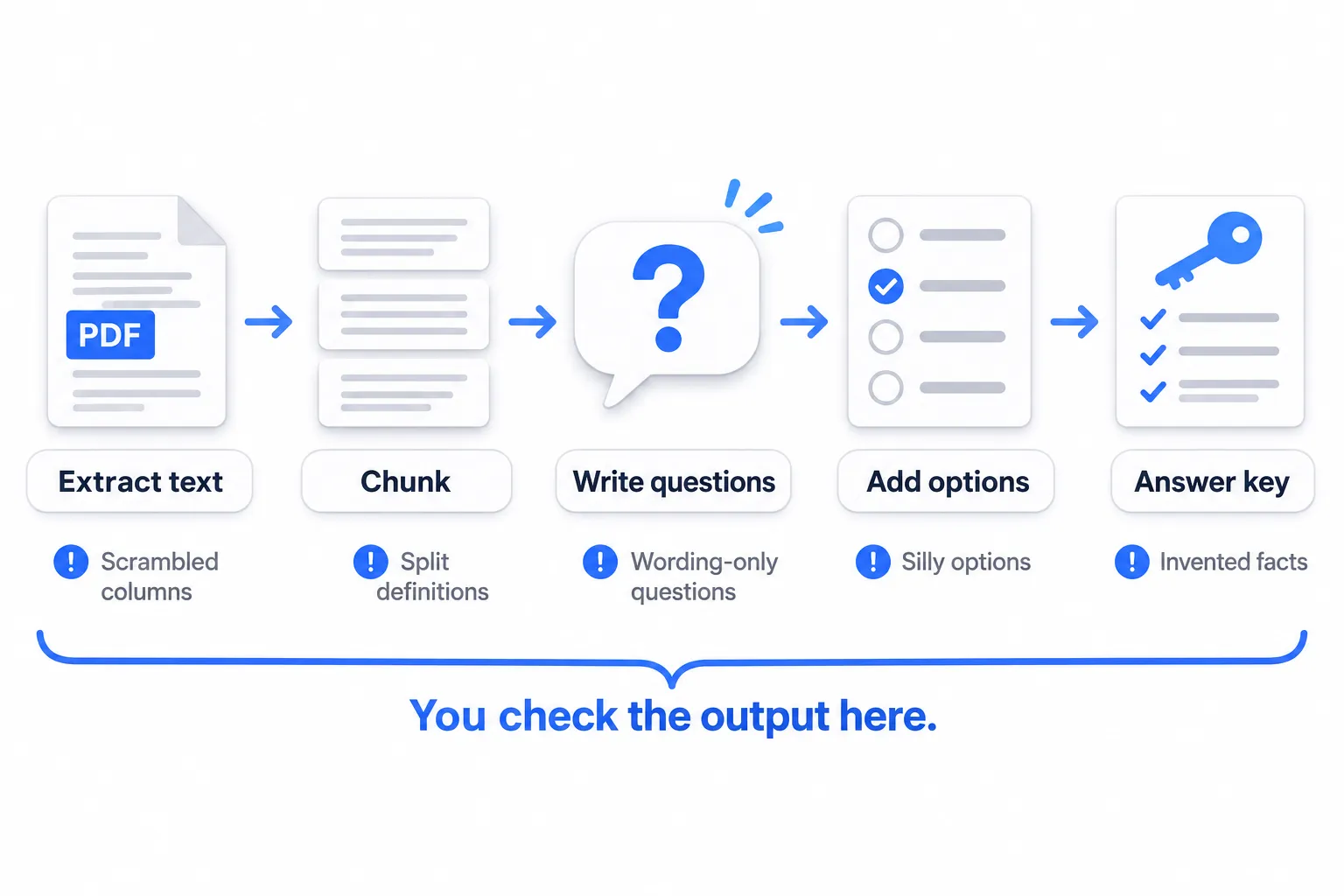
Under the hood, nearly every tool does the same five things, and each one has its own way of failing.
| Stage | What happens | What typically goes wrong |
|---|---|---|
| 1. Text extraction | The tool reads the text layer of the PDF, or runs OCR on a scan | Scrambled columns, lost tables and equations, misread characters in scans |
| 2. Chunking | The text is cut into passages small enough for the model to read | A definition lands in one chunk and its example in another, so questions miss the link |
| 3. Question writing | A language model proposes questions from each passage | Questions copy nearby sentences, so they test wording rather than understanding |
| 4. Answer options | The model writes one correct answer and several wrong ones | Wrong options nobody would pick, or two options that are both defensible |
| 5. Answer key | The model states the answer and often a reason | Confident explanations that quietly add facts the PDF never contained |
Two things follow from this. First, the model has no idea what your exam or training will emphasise. It writes questions about whatever is in the passage, so a passing aside gets the same weight as the central argument. Second, everything downstream depends on stage one. If extraction is wrong, every question built on it is wrong too, and nothing in the output will tell you.
Distractor: a wrong answer option in a multiple-choice question. Good distractors are plausible mistakes a student might really make, such as a confused term or a half-remembered rule. Weak distractors are the ones nobody would pick, which turns a four-option question into a choice between two.
Prepare the PDF Before You Generate Anything
Ten minutes of preparation changes the output more than any setting in the tool.
Check that the text is real
Open the PDF and try to select one sentence with your cursor, then search for a distinctive word with Ctrl+F (Cmd+F on a Mac). If you can’t select or find it, the pages are pictures, and the generator is either running OCR behind the scenes or giving up. A scan can work, but only when it’s straight and sharp. The mechanics are covered in why a scanned PDF isn’t searchable. An AI PDF editor like MojoPDF reads scanned pages as they come into view, so a misread term in a photographed handout can be corrected in place before any questions are generated from it.
Cut the file down to what you’ll be tested on
Cover pages, contents lists, reference lists, acknowledgements and reading lists all produce junk questions, because the model will happily ask who wrote the preface. Remove them. If you’re working from a whole textbook, go chapter by chapter, and splitting the PDF by page range without wrecking the original is the quickest way to get sections of a manageable size. Around 5 to 15 pages per run is a sensible range: long enough for context, short enough that you can check the result against the source.
Know what extraction handles badly
- Slides exported to PDF are fragments: bullet points with no connecting sentences. The model fills the gaps, and that is where invented content creeps in. Add your own notes first.
- Tables turn into rows of unlabelled numbers.
- Equations and chemical formulas are often flattened or lost, so don’t trust a generated maths question until you’ve seen the original expression.
- Multi-column layouts can be read straight across the page, mixing two columns into one sentence.
- Figures and captions are frequently dropped, along with anything a question would need from them.
Before you generate anything, copy one paragraph from the PDF into a plain text editor. If it pastes cleanly and in order, extraction is probably fine. If words come out jumbled, fix the file first, because every question built on it will inherit the damage.
Six Ways Generated Questions Go Wrong
The same handful of faults turn up in almost every batch. Learn to spot them and the review goes quickly.
Trivia about the text, not the topic
Questions that begin “According to the passage…” or “The author states…” can only be answered by someone who has read this exact file. A useful test is whether someone who understands the subject, but has never seen your PDF, could answer it. If not, delete it.
Recognition instead of recall
When the correct option repeats a distinctive phrase from the stem, or is noticeably longer and more detailed than the others, a student can pick it without knowing anything. Students learn to game these quickly, and the quiz stops measuring learning.
Answers leaked by neighbouring questions
Generators write each question from a chunk, with no memory of the others. So question 4 often states the fact that question 9 asks about, and the quiz answers itself if you read it in order.
Weak or double-correct distractors
Wrong options like “None of the above” or an absurd value are free points. The opposite problem is worse: two options that are both defensible, which punishes the student who knows more than the PDF says.
Facts the PDF never said
The model adds plausible detail from its general knowledge, especially in answer explanations: a date, a name, a threshold that appears nowhere in your file. Some of it is right, some of it is wrong, and none of it is marked. The wider pattern is covered in what AI does well with PDFs and where it fails.
Duplicates and lopsided coverage
Twelve questions on the first three pages and none on the last chapter. Five rewordings of the same definition. Neither is a bug in the traditional sense; both are what chunk-by-chunk generation produces.
Studying from the quiz without checking the answer key. A wrong key teaches you the wrong thing, and you will defend it confidently in the exam. Verify each answer against the page in the PDF before you trust it.
What Do Good Quiz Questions Look Like?
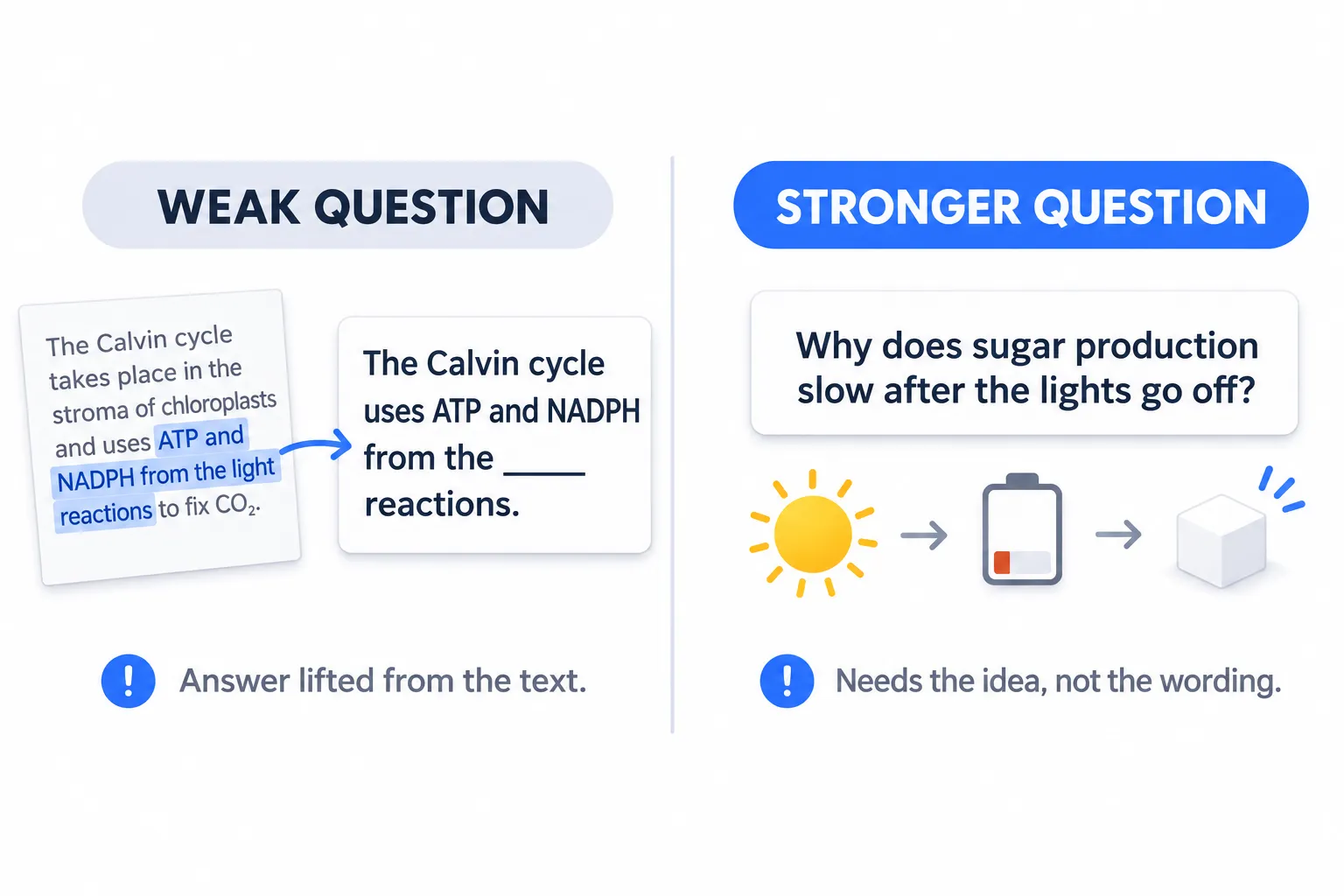
Take one sentence from a biology handout: the Calvin cycle uses the ATP and NADPH produced by the light-dependent reactions to build sugar from carbon dioxide.
A typical weak question is a fill-in-the-blank: the Calvin cycle uses ATP and NADPH from the blank reactions. The answer is lifted straight from the sentence, and anyone who read the line a minute ago can complete it.
A stronger question asks why sugar production slows soon after the light is switched off. Answering it means knowing that the light reactions supply the ATP and NADPH, so the cycle runs short when they stop. It tests the idea, not the wording, and it’s the kind of question a generator can write if you ask for explanation or application questions instead of recall.
Different question types suit different jobs:
| Type | Best for | Watch out for |
|---|---|---|
| Multiple choice | Quick checks and common misconceptions | Weak distractors, leaked answers |
| Short answer | Real recall, in your own words | Marking: a correct answer can be worded differently from the key |
| Fill in the blank | Key terms and sequences | Blanks that grammar alone can fill |
| True or false | Testing one specific claim | Easy to guess, so use it only for popular misconceptions |
| Scenario question | Applying an idea to a new situation | Generators usually need to be asked for these explicitly |
| Matching | Terms to definitions | Tests vocabulary and little else |
For practical guidance on writing good multiple-choice items, Vanderbilt’s Center for Teaching publishes teaching guides that are worth reading before you edit a batch.
A Worked Example: Twelve Pages of Lecture Notes
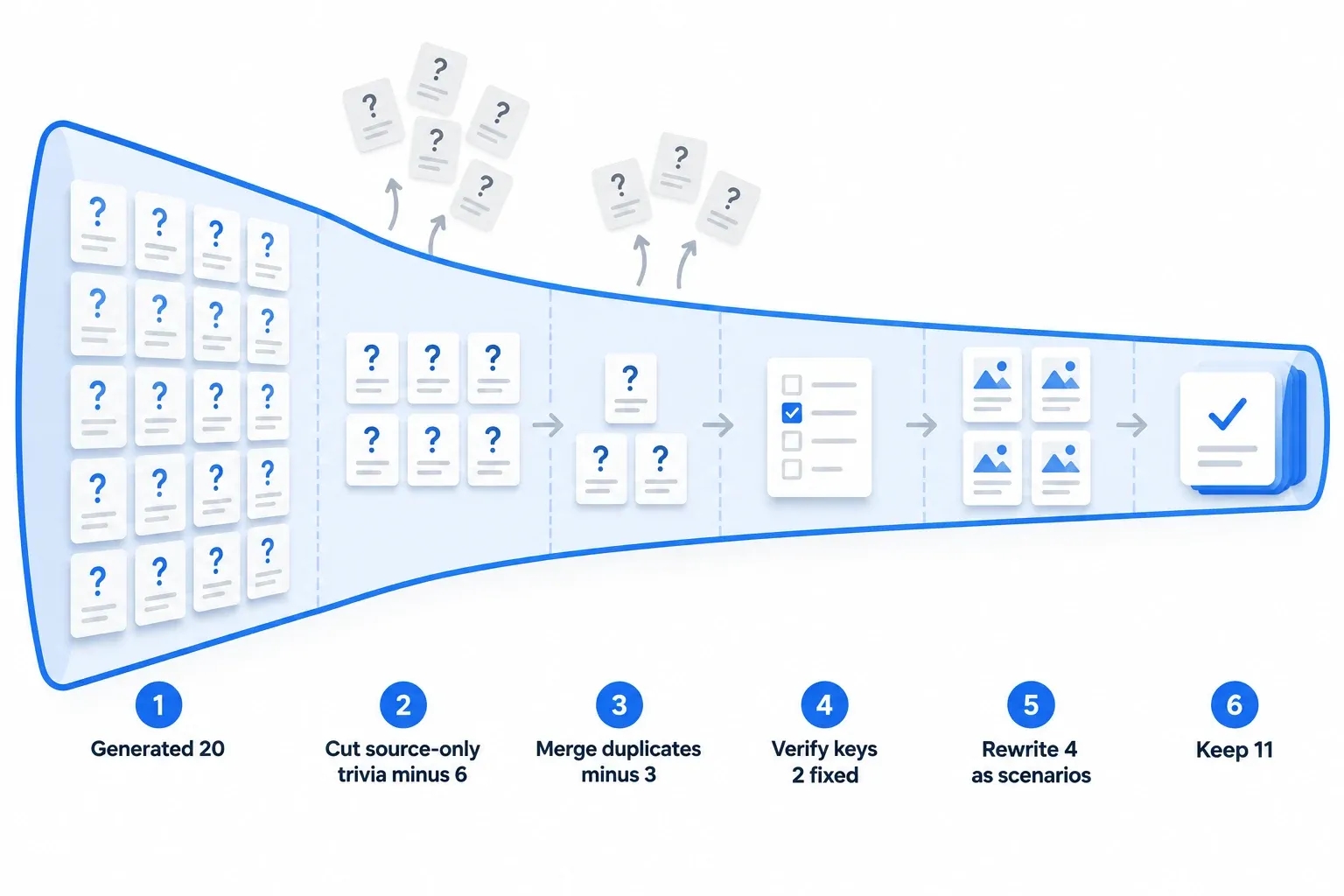
Imagine a business student with a twelve-page PDF on cash flow statements and an exam in nine days. She runs it through a quiz tool and gets twenty multiple-choice questions back in seconds.
Then she reads them properly. Six begin with “according to the notes” and ask for exact figures from the worked examples, so she deletes them. Three are the same question about operating activities in different words, so she keeps the best one and drops the other two. That leaves eleven.
She then checks each answer key against the PDF. Two are wrong in ways that matter. One asks where interest paid belongs on the statement and gives financing as the answer, but her course follows US GAAP, which treats it as an operating item. The model had drifted into the other framework. She fixes both keys and notes the page number beside each.
Finally she rewrites four of the surviving questions as short scenarios, such as classifying a company’s equipment sale and loan repayment into the right sections. Total time is about twenty minutes, and she ends with eleven questions she can trust, more than half of which test application rather than recall. The generator saved her the typing, and her review made the quiz worth taking.
How Do You Check a Generated Quiz in Ten Minutes?
Here is the routine from that example as a procedure you can repeat.
- Cut the source-only questions. Delete anything that starts “according to the passage” or asks for a detail only this file contains.
- Verify every answer key. Keep the PDF open beside the quiz and search for the key term. Note the page next to each answer, so you can go back to it later.
- Fix the options. Replace silly distractors with common mistakes, and rewrite any question where two options could both be right.
- Scan for leaks. Read each question as if you had never seen the others, and remove facts that later questions give away.
- Rebalance coverage. Count questions per section. Cut the overrepresented ones and add a few for the gaps.
- Rewrite two or three as scenarios. Turn a definition question into a short case where the student has to apply the idea.
- Merge duplicates. Keep the clearest version of each concept.
- Take it cold. Leave it overnight, then answer it without looking at the key. Any question that confuses you for the wrong reason needs another edit.
The structure is the same whether you’re preparing for an exam or building a knowledge check for new starters. The purpose is to make sure each surviving question has one defensible answer and takes real thought to reach it.
Is It Safe to Upload Course Material or Work Documents?
It depends on two separate questions: who owns the material, and where the file goes.
On ownership, making a quiz from a textbook chapter for your own revision is a different thing from sharing that quiz with a class or posting it online. Rules vary by country and by publisher, and course materials often come with their own terms, so check the licence or your institution’s policy before you pass anything on. This is general information, not legal advice.
On privacy, a handbook, HR policy or client report can contain names, figures and internal procedures. Before you upload one to any tool, find out where it’s processed, how long it’s kept, whether you can delete it yourself, and whether uploads are used to train models. A specific retention period and an identifiable company behind the tool are good signs. Silence is not.
You can also shrink the exposure. Cut the file down to the pages you need, remove names and account numbers, and try the tool on a harmless sample first. A PDF to quiz generator doesn’t need the signature page, the salary table or the client’s address to write good questions.
Teachers and Trainers: Quizzes From Handbooks and Policies
The stakes change when other people take the quiz. A wrong answer key in your own revision costs you a mark. In a compliance or safety quiz, it can mean staff learn something incorrect and get certified for it.
A few habits make generated quizzes safer for groups:
- Tie every question to a page number in the source version, so anyone can check the key in seconds.
- Keep the source and the quiz together, with a version number on both. When the policy changes, the quiz should change with it, and you should be able to tell which questions are affected.
- Have a second person take it before it goes live. They will find the ambiguous option you stopped seeing.
- Don’t use it unreviewed for high-stakes assessment. A quiz built to check understanding of a handbook is not automatically a fair, valid exam.
- Check accessibility. Questions that depend on a figure or a table need alternative text or a rewritten version for readers who can’t see them.
Treat the generator as a drafting assistant that gives you twenty candidate questions to edit, and keep your name on the final version.
Build a Study Loop Around the Quiz
The quiz is the start of the learning, not the end of it. A simple loop gets more from it:
- Take the quiz without notes and mark it honestly.
- For each miss, go back to the page in the source and read the passage, noting why you got it wrong.
- Generate or write fresh questions from your weak sections only.
- Repeat later, with gaps that grow, for example the next day, a few days after, then a week on.
- Shuffle the order and retire questions you’ve answered correctly several times.
One trap is retaking the same quiz until you know the answers by position. That trains you to remember the quiz, not the subject. Change the wording, reorder the options, or turn a recognition question into a short answer.
Spacing matters as much as testing. The review by Dunlosky and colleagues rated distributed practice highly alongside self-testing, so three short sessions across a week will usually beat one long evening.
What a PDF to Quiz Generator Is Really For
Used well, it removes the slowest part of testing yourself: turning pages of text into questions. Used badly, it produces a tidy-looking quiz that rewards skimming.
The difference is the ten minutes you put in. Start with a clean, trimmed file, ask for questions that need understanding, cut the trivia, check every key against the page, and rewrite a few into scenarios. Do that and a batch of twenty questions becomes something like eleven you can rely on, which is more than most people would have written by hand in the same time.
- Quizzing yourself beats rereading, but only if answering takes real effort.
- A PDF to quiz generator writes a first draft. It can’t know what matters for your exam or your team.
- Prepare the file first: make sure the text is selectable, cut contents lists and references, and work in chunks of roughly 5 to 15 pages.
- Watch for six faults: source-only trivia, recognition questions, leaked answers, weak distractors, invented facts and uneven coverage.
- Verify every answer key against the page, and rewrite a few questions as scenarios.
- Check ownership and privacy before uploading course or work documents, and review any quiz before others take it.
- Close the loop: take it, review misses, regenerate from weak sections and space the repeats.

MojoPDF
Taj
A professional SaaS founder offering great value to it's customers.
Frequently Asked Questions
It’s accurate enough to draft from, not to trust blindly. The most common problems are answer keys that bring in facts the PDF never stated and questions that lean on wording rather than ideas. Check each key against the page before you study from it.
Often badly. Equations, chemical formulas and tables can be flattened or dropped during extraction, so a generated question may quote a wrong or incomplete expression. Compare any formula-based question with the original page, or write those questions yourself.
Ask for more than you plan to keep, because many will be cut. A common starting point is ten to twenty questions per 5 to 15 pages. After review, expect to keep somewhere around half.
Not automatically. Sharing beyond your own revision may be restricted by the publisher’s terms or your institution’s policy, and questions based closely on a copyrighted text can still raise issues. Writing from your own notes or openly licensed material is the safer route, and this is not legal advice.
Usually by copying them across or using the platform’s own spreadsheet or CSV template. Each platform expects its own column layout, so read its import documentation before you format anything. Don’t assume every generator offers a matching export.
Limits vary by tool and by file size, and long documents are usually split into chunks internally. That can leave some sections with many questions and others with none. Running one chapter at a time gives you more even coverage.
Flashcards test one fact at a time and you mark yourself, while a quiz can include options, explanations and scenarios. Both inherit the same weaknesses from the source text. Cards suit vocabulary and definitions, and quizzes suit applying ideas.
Generate section by section and ask for each question to cover a different subheading. Then scan the stems for the same key term and merge anything that tests the same idea. Duplicates are a by-product of chunk-by-chunk writing.
Not without careful review. A graded exam has to be fair, unambiguous and matched to what you taught, and generated questions often fail on all three. Treat the output as a draft, and have a colleague take it before use.
It generally works in widely used languages, but quality varies, especially for specialist terms and the grammar of answer options. Ask a fluent reader to check the wording and the keys. Errors in a second language are harder to spot than in your own.
Yes, and it usually gives better results. Extract the pages you need into a separate file first, so the generator doesn’t waste questions on contents lists, references or unrelated chapters. Keep the original untouched.