Convert PDF to Mind Map Without Losing the Argument
Imagine opening a 95-page regulatory whitepaper or a dense graduate-level literature review at 9:00 PM, needing to map out every core claim, counterargument, and dependency before a morning briefing. Reading linearly from page one to page ninety-five takes hours, yet tossing the whole file into a one-click generator usually spits out a bloated spiderweb of 300 generic bubbles that hides the real thesis.
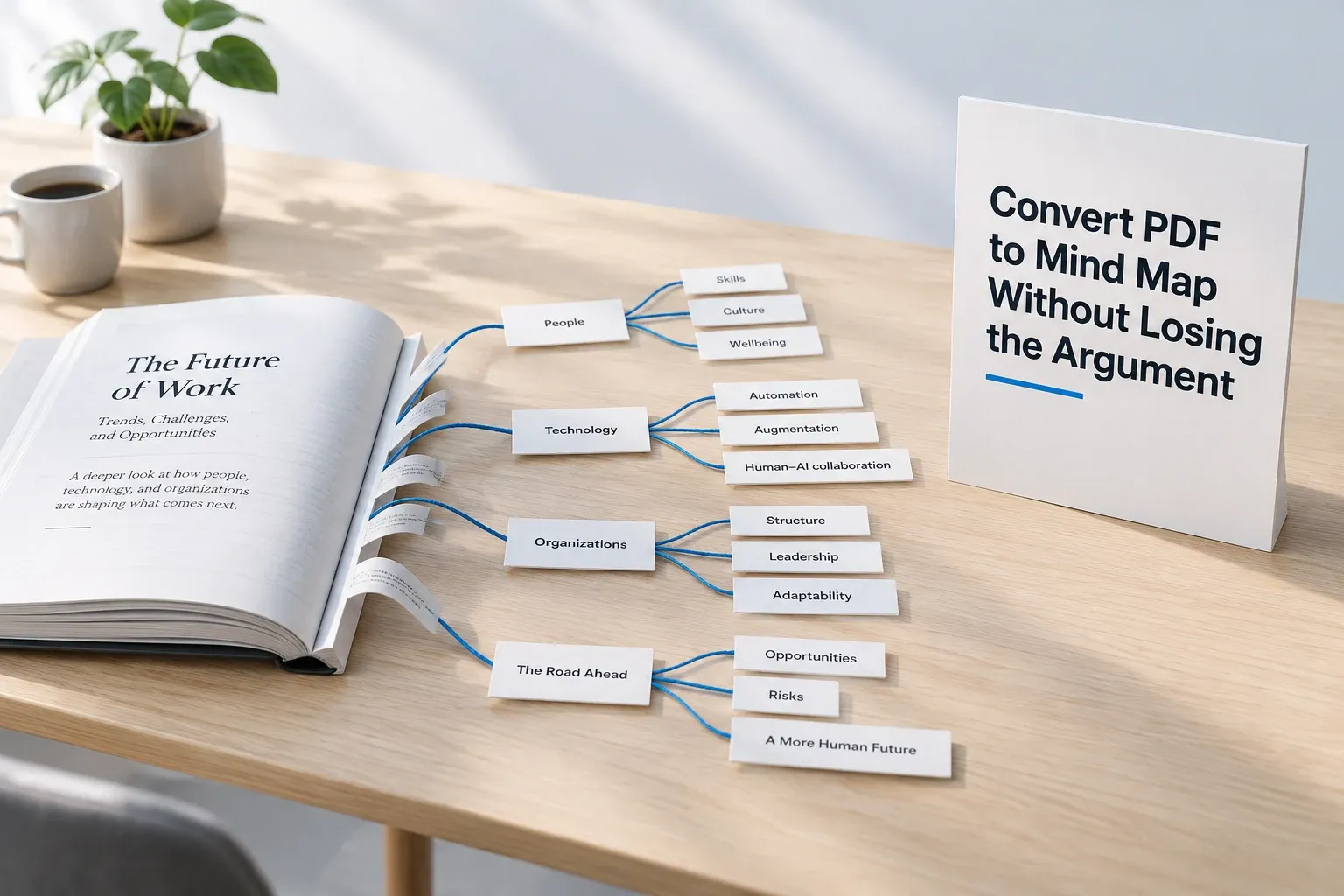
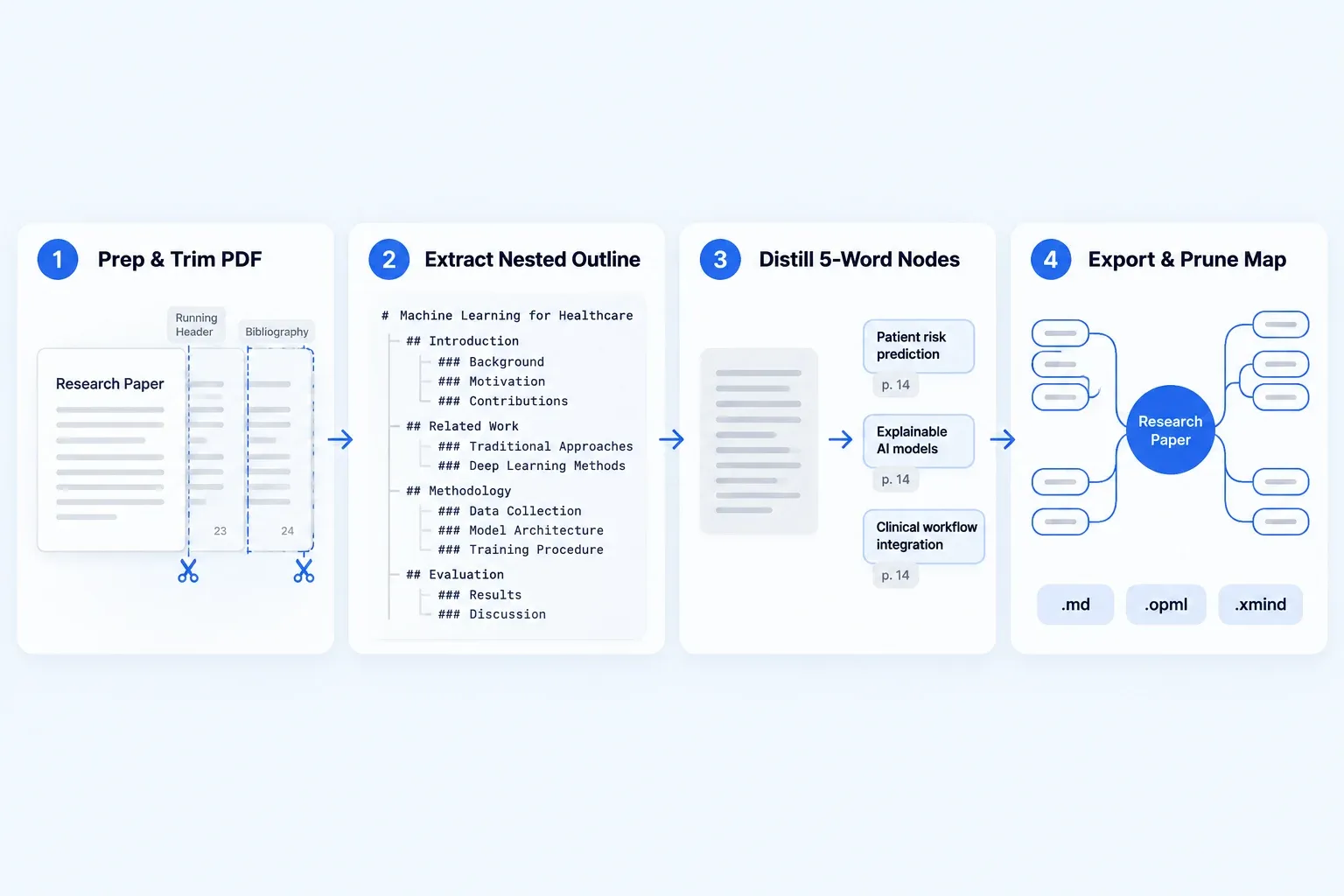
To convert PDF to mind map effectively, you have to treat the conversion as structural extraction rather than automatic summarization: clean the PDF’s heading hierarchy or split it by chapter first, cap node labels at five to seven words, separate core arguments from supporting evidence using distinct branch levels, and export into an editable format like Markdown, OPML, or XMind so you can prune the tree manually.
Why Most Auto-Generated Mind Maps Fail on Real Documents
A PDF is a visual page-description format, not a structured outline. Unless the author deliberately built a tagged document with proper H1, H2, and H3 bookmarks, a parser looking at a PDF only sees font sizes, bold weights, and vertical spacing.
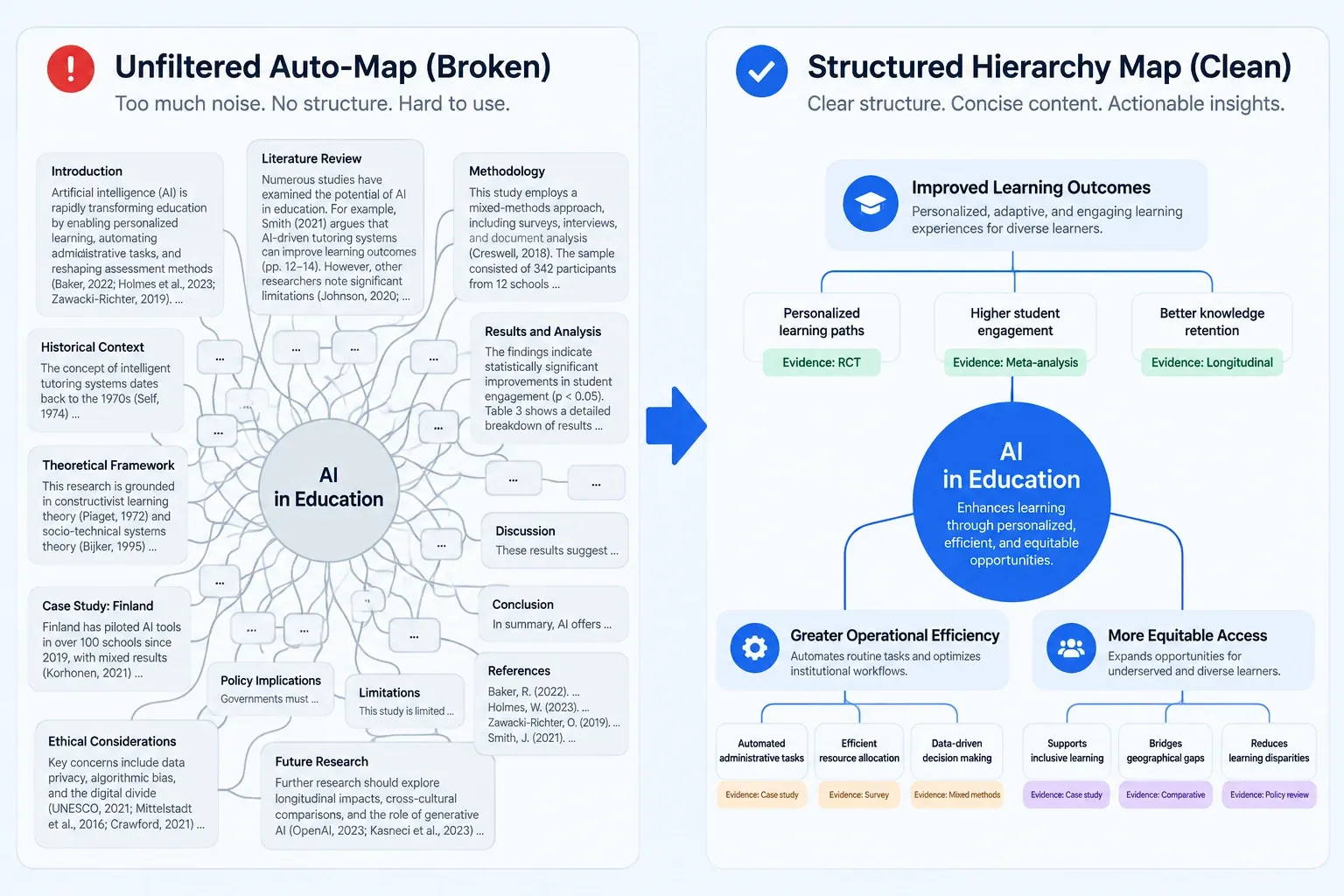
That technical blind spot causes four predictable failures whenever you convert PDF to mind map automatically:
- Flat hierarchy traps: When a PDF uses identical 12-point bold text for both major section headers and minor table captions, an automated generator places both at Level 1. A 40-page report suddenly has 65 root branches radiating from the center node, destroying any sense of priority.
- Paragraph-stuffed bubbles: Naive tools simply chop each paragraph into a node and paste the first two sentences inside. Once a node contains 35 words, it stops functioning as a visual memory cue and turns back into a tiny, harder-to-read PDF.
- Lost cross-references and causal links: Academic papers, legal briefs, and technical architecture specs rely on relationships between distant sections—for instance, how a limitation on page 42 invalidates an assumption on page 7. Standard radial trees only show parent-child containment, completely missing cross-branch dependencies.
- Noise from headers, footers, and citations: Running page titles, author affiliations, journal DOI strings, and inline citation brackets like
(Smith et al., 2024)frequently get parsed as standalone child nodes.
Never feed an entire 200-page textbook or technical manual into a mind-map generator in a single pass. Most language models and parsers hit context compression limits after 15,000 to 25,000 words, which causes them to map the first three chapters in sharp detail and compress the final ten chapters into vague, three-word placeholders.
Linear Text vs. Spatial Mapping: When a Mind Map Actually Helps
Converting every document into a radial diagram is a productivity trap. Some documents are inherently sequential and lose clarity when bent into branches, while others are impossible to grasp until you see their architecture all at once.
Research on spatial learning and Tony Buzan’s foundational principles of mind mapping shows that radial diagrams work best when you need to compare competing branches, spot structural gaps, or recall a complex taxonomy from memory. Before you convert PDF to mind map, check whether your document belongs in the left column or the right column:
| Document Type | Best Representation | Why It Works (or Fails) |
|---|---|---|
| Literature reviews & thesis papers | Multi-level mind map | Groups competing methodologies, sample sizes, and findings onto visible parallel branches |
| Software specs & system architectures | Concept map with cross-links | Shows how modules, APIs, and data stores depend on each other across subsystems |
| Contracts, leases & compliance rules | Conditional decision tree | Separates obligations, deadlines, trigger events, and termination clauses cleanly |
| Step-by-step SOPs & recipes | Numbered checklist or flowchart | Strict chronological order matters more than radial grouping |
| Financial ledgers & raw data tables | Spreadsheet (.xlsx or .csv) | Numerical aggregation and row filtering require grid coordinates, not nodes |
Mind Map vs. Concept Map: Choosing the Right Visual Structure
People often say “mind map” when they actually need a concept map, and picking the wrong structure makes complex PDFs harder to read:
- Radial Mind Map (Strict Tree): One central topic in the middle, branching outward into parent and child nodes. Every child node has exactly one parent. Use this for book chapters, lecture notes, study guides, and brainstorming.
- Concept Map (Network Graph): Multiple focal hubs connected by labeled directional arrows (such as “causes”, “requires”, or “contradicts”). Use this for legal arguments, scientific mechanisms, and root-cause analyses where ideas loop back on each other.
How to Prep a PDF Before Converting It Into a Mind Map
The quality of your diagram is decided before the conversion tool ever runs. Spending three minutes preparing the source file eliminates 80% of the cleanup work afterward.
- Check whether the PDF has selectable text: Drag your cursor across a paragraph. If you cannot select individual words, the file is an image-only scan. Run OCR first—our guide on why a scanned PDF is not searchable and how to fix it walks through turning flat scans into clean, selectable text layers.
- Strip non-content pages: Remove the cover page, copyright notice, blank pages, reference bibliography, and appendix tables before mapping. A 30-page academic paper often has 9 pages of bibliography at the end; leaving those in floods your mind map with hundreds of author names.
- Split oversized files into logical chunks: If you are mapping a 300-page book or annual report, split it into individual chapters first (no more than 25–40 pages per file) and generate one focused map per chapter. If you need to divide a large document cleanly without losing bookmarks, follow our walkthrough on how to split PDF pages without wrecking the original.
- Verify bookmark structure: Open the PDF’s sidebar bookmarks. If the file already has nested bookmarks matching its chapters and subsections, an outline-based parser can convert that exact tree in seconds without guessing from font sizes.
If you are using an AI prompt or outline extractor to turn a PDF into a mind map, instruct it to output a nested Markdown list (`#`, `##`, `###`, `-`) first rather than a finished image. Reviewing a 60-line Markdown outline takes 90 seconds, and you can paste that exact Markdown into XMind, MindMeister, Markmap, or Obsidian to render an interactive diagram instantly.
Step-by-Step: Convert PDF to Mind Map With Clean Hierarchy
Whether you are mapping a research paper, a client discovery brief, or a study guide, use this six-step workflow to produce a diagram you can actually think with:
- Define your central question (Root Node): Never name the root node after the generic file name like
Q3_Report_Final_v2.pdf. Name it after the specific question you are trying to answer—for example, “Why Did Enterprise Churn Rise 14% in Q3?” That single constraint filters out irrelevant sections immediately. - Extract the structural skeleton (Level 1 & Level 2): Pull only the major section headings and subheadings into a nested outline. Aim for 3 to 7 Level-1 branches radiating from the center. If you have more than seven primary branches, group related sections under broader themes.
- Distill each subsection into atomic claims (Level 3): Under each subheading, write one short node per key claim, mechanism, or finding. Keep every node strictly under 7 words—use strong nouns and active verbs (
“Latency spikes above 400 concurrent users”instead of“The authors found that system latency begins to spike when there are more than 400 concurrent users”). - Attach evidence and metrics at the leaf level (Level 4): Put specific numbers, dates, sample sizes, and page citations (
p. 18) on the outermost twigs of each branch. Keeping raw data at the perimeter lets you collapse or expand details without cluttering the core argument. - Add cross-links and visual cues: Draw dashed connector lines between branches that reinforce or contradict each other, and apply a restrained color code—one accent color for critical risks or exam-heavy concepts, and neutral tones for background context.
- Test the map by explaining it out loud: Close the original PDF and talk through your mind map from the center outward. Anywhere you stumble or have to reopen the PDF to remember what a node means, refine the node label until it triggers recall on its own.
Worked Example: Mapping a 38-Page Market Research PDF in 10 Minutes
Let’s trace how this works on a concrete document: a 38-page B2B SaaS pricing benchmark report containing 6 chapters, 19 charts, and a 7-page methodology appendix.
The messy first pass: Dropping the raw 38-page file straight into an automatic diagram generator produces a 140-node spiderweb. Worse, the generator creates six equal Level-1 branches for Executive Summary, Introduction, Survey Demographics, Pricing Models, Discounting Trends, and Appendix, burying the report’s most important finding—that usage-based hybrid pricing grew 28% faster than seat-only plans—four levels deep under Pricing Models.
The structured fix:
- Step 1 (Trim): Delete pages 1–3 (title and table of contents) and pages 32–38 (appendix), leaving 28 substantive pages.
- Step 2 (Reframe Root): Set the center node to “2026 B2B Pricing Shifts & Revenue Impact”.
- Step 3 (Consolidate Pillars): Merge
Executive SummaryandIntroductioninto the existing thematic branches so there are only 4 clean Level-1 pillars: 1. Seat vs. Usage Models, 2. Enterprise Discounting, 3. AI Add-On Monetization, and 4. Renewal & Expansion Triggers. - Step 4 (Prune & Cite): Convert each chart’s takeaway into a 6-word Level-3 node with a page tag—for instance, “Hybrid tiers retain 19% higher NRR (p. 14)” and “Discounts above 25% double churn risk (p. 22)”.
In ten minutes, a 38-page PDF compresses into a single-screen visual brief with 42 high-signal nodes—and every single claim remains traceable back to its exact page number.
Choosing the Right Export Format: Markdown, OPML, SVG, or PNG?
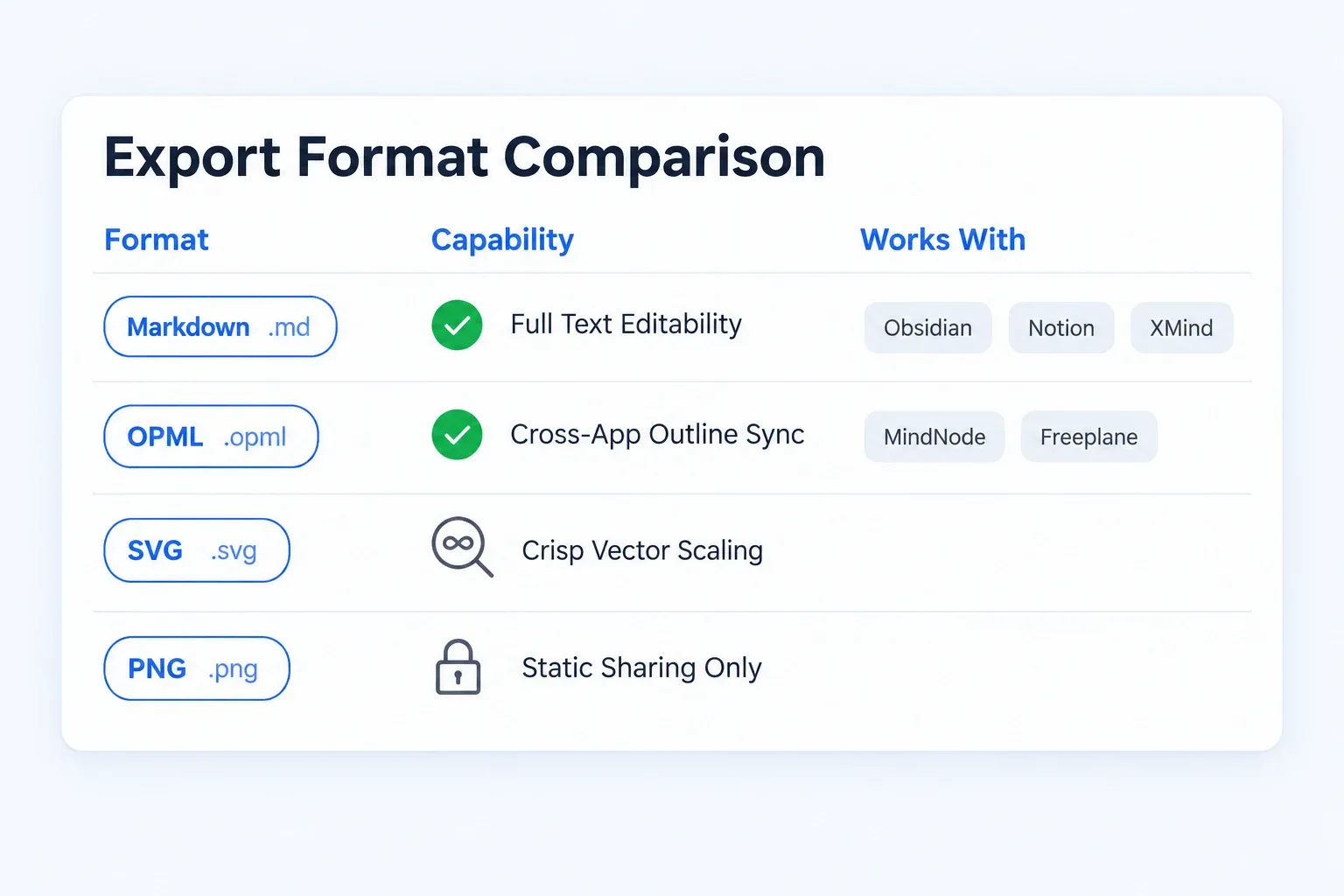
Once you convert PDF to mind map, how you save the output determines whether the map stays a living thinking tool or becomes another static picture you can never edit.
| Export Format | Best Use Case | Editable Structure? | Compatible Tools |
|---|---|---|---|
Markdown (.md) | Future-proof text outline, AI re-prompting, and note-taking vaults | Yes (plain text headings & bullets) | Obsidian, Logseq, Notion, Markmap, XMind |
OPML (.opml) | Moving nested outlines cleanly between dedicated mind-mapping apps | Yes (XML outline standard) | XMind, MindNode, Freeplane, Scrivener, Workflowy |
SVG (.svg) | High-resolution zoomable diagrams for web docs and presentations | Partially (vector shapes in design apps) | Browsers, Figma, Illustrator, Canva |
| PNG / PDF | Quick Slack shares, printing on A3/Tabloid paper, or static slide embeds | No (flattened pixels or fixed page) | Any viewer, email, PowerPoint |
As the World Wide Web Consortium’s SVG specification highlights, vector graphics scale infinitely without pixelation, which makes .svg vastly superior to .png whenever you export a wide mind map with 60 or more nodes. Even better, always keep a .md or .opml master copy alongside your visual export so you can add new branches later without starting over.
A graduate researcher preparing for oral qualifying exams converted 24 core journal PDFs into nested Markdown outlines first, imported each `.md` file into a single master mind map, and color-coded conflicting empirical findings across papers. During the exam, she could recall exact author names, sample sizes, and methodological flaws by visualizing which quadrant of the map each study occupied.
What AI Mind-Map Tools Get Wrong (and How to Audit Them)
Modern AI tools can read a complex PDF and propose a visual tree in seconds, which is genuinely useful for breaking through blank-page paralysis. Still, treating the first AI draft as finished work introduces three subtle risks:
- Hallucinated hierarchy: When a PDF author writes three exploratory hypotheses in a discussion section, an AI mapper frequently promotes them to definitive conclusions at Level 1 because they use bold summary phrasing.
- Smooth-sounding generalizations: AI summarizers love replacing sharp technical distinctions with bland umbrella terms. If a legal PDF distinguishes between “indemnification for third-party IP claims” and “limitation of direct damages”, an over-eager generator may collapse both into a single node called “Liability Terms”—erasing the exact nuance you needed.
- Missing negatives and caveats: Words like “unless”, “except when”, and “not statistically significant” often get dropped when an algorithm shortens a sentence to fit inside a five-word node.
For broader context on where automated document AI shines and where human verification stays essential, see our analysis of what AI for PDFs does well and where it fails. Similarly, if you are turning study PDFs into active recall materials alongside your diagrams, our guide on why most PDF to quiz generators produce weak questions shows how to audit AI-extracted concepts so you test deep understanding rather than surface trivia.
Privacy Considerations When Mapping Confidential PDFs
Students mapping public lecture slides rarely need to worry about cloud uploads, but professionals frequently convert sensitive PDFs—board strategy decks, M&A due diligence memos, unreleased product roadmaps, or patient case studies—into visual diagrams.
Before uploading a confidential PDF to any web-based mind-mapping tool, verify three safeguards:
- Encryption in transit and zero model training: Check that the platform uses TLS encryption and explicitly prohibits using uploaded customer documents to train foundation models.
- Local redaction before cloud mapping: If a 50-page internal report contains client names, salary tables, or proprietary pricing on three pages, redact or remove those pages locally before generating your diagram.
- Offline Markdown generation for restricted files: For strictly air-gapped or regulated documents (such as HIPAA-covered clinical records or privileged legal discovery), extract the headings locally and render the diagram offline using a local Markdown-to-mind-map viewer so zero bytes ever leave your machine.
Final Thoughts
When you convert PDF to mind map, the goal is not to decorate a document with colorful bubbles—it is to expose the hidden skeleton of an argument so you can spot flaws, compare branches, and remember key evidence under pressure. Trim non-content pages first, enforce a strict five-to-seven-word limit per node, keep page citations on the outer twigs, and export into an editable format like Markdown or OPML so your map evolves alongside your thinking.
- Prep the PDF first by running OCR on scans, deleting bibliographies, and splitting 100+ page books into single chapters.
- Frame the center root node around a specific question rather than a generic file name to filter out low-value sections.
- Limit the tree to 3–7 Level-1 branches and keep every node under 7 words so the diagram works as a visual memory trigger.
- Place raw statistics, dates, and exact page numbers (`p. 14`) on outer leaf nodes so the core hierarchy stays scannable.
- Always save an editable `.md` or `.opml` master copy alongside `.svg` or `.png` exports so you can prune and expand branches later.

MojoPDF
Taj
A professional SaaS founder offering great value to it's customers.
Frequently Asked Questions
Start by removing cover pages, bibliographies, and appendices so only core content remains, then extract the document into a nested Markdown outline (#, ##, ###) before rendering the visual tree. Capping your diagram at 3 to 7 main branches and keeping each node under 7 words preserves the document’s hierarchy instead of dumping full paragraphs into bubbles.
Yes, but you must run optical character recognition (OCR) on the scanned pages first so the file contains selectable text rather than flat page images. Once OCR creates a clean text layer, an outline extractor or AI mapper can parse headings and body text normally.
It is safe only if the service encrypts uploads in transit, deletes temporary files automatically, and explicitly states that your documents are never used to train AI models. For highly sensitive legal, medical, or financial PDFs, strip sensitive pages locally first or use an offline Markdown-to-mind-map tool on your own computer.
Export to Markdown (.md) or OPML (.opml) if you want to edit branches, reorganize nodes, or move your diagram between apps like XMind, MindNode, Obsidian, and Notion. When you need a finished visual for a slide deck or document, export as SVG (.svg) rather than PNG so text stays razor-sharp at any zoom level.
The sweet spot for a single mind map is 5 to 35 pages, such as one book chapter, a research paper, or a single project proposal. For documents over 50 pages, split the PDF by chapter first and generate separate maps so detail does not get compressed into vague summaries.
Most automated tools convert every bold line, running page header, and multi-sentence paragraph directly into separate nodes without filtering for importance. Pruning non-content pages beforehand and shortening node labels to 5–7 words immediately eliminates visual clutter.
A mind map radiates outward from one single central idea in a strict parent-child tree, making it ideal for summarizing book chapters and lecture notes. A concept map allows multiple hubs and labeled cross-linking arrows between branches, which works better for complex systems, cause-and-effect mechanisms, and comparing competing theories.
Yes. Convert your PDF’s structure into a nested Markdown list (# for the root topic, ## for main branches, ### for sub-branches), then import that .md file directly into XMind, render it live inside Obsidian using the Markmap plugin, or paste it into Notion.
Add short parenthetical page tags like (p. 12) or (pp. 18–19) at the end of your outermost leaf nodes during outline extraction. Keeping citations on the outer twigs lets you jump straight back to the exact source page in the PDF during exams, meetings, or fact-checks.
Avoid mind maps for strict step-by-step standard operating procedures, chronological timelines, and raw financial spreadsheets. Sequential instructions belong in a numbered checklist or flowchart, while numerical tables belong in Excel or CSV where formulas can verify totals.